

Loading...
Contact us
Loading...
Contact us
Sennheiser TeamConnect Bar M – All-in-One Video Bar for Mid-Sized Meeting Rooms

Sennheiser TeamConnect Bar M – All-in-One Video Bar for Mid-Sized Meeting Rooms

Contact

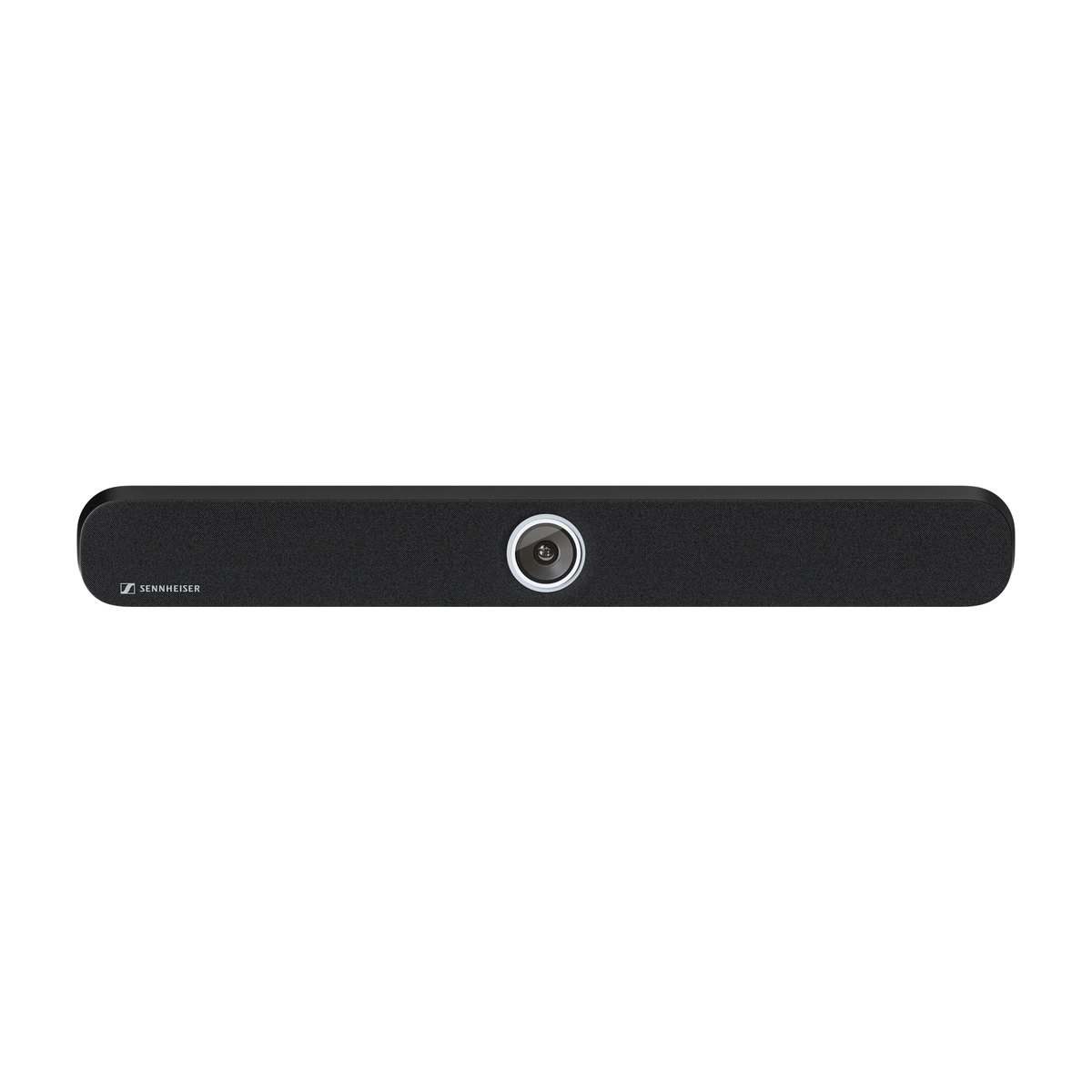
Sennheiser TeamConnect Bar M (TC Bar M) is an all-in-one video bar with a 4K camera, 6 beamforming microphones and 4 speakers, designed for medium meeting rooms of 4.5 × 6 m with up to 10-12 people. It connects to the computer running the meeting software (a personal laptop or a computer installed in the room) over a single USB-C cable and is certified for Microsoft Teams and Zoom. When the room is longer than the 5 m pickup range, your organization can add ceiling microphones over Dante without a separate audio processor.

Key specifications

SpecificationSennheiser TeamConnect Bar M
PlatformCertified for Microsoft Teams (Microsoft's Teams Rooms peripheral catalog) and Zoom, used over USB-C with a computer
Room size4.5 × 6 m (up to 27 m²), up to 10-12 people
Camera4K 30 fps, 120° diagonal field of view, Auto Framing, Person Tiling
Microphones and speakers6 MEMS beamforming microphones with up to 5 m pickup, 4 speakers, 20 W RMS, 84 dB SPL
Connectivity and power1 × USB-C to the computer, 2 × HDMI outputs, 2 × RJ45 (network and Dante), 18 V power adapter (no PoE)
  • Color: black. The same series includes the TC Bar S for small rooms of up to 7 people.
  • Wireless presentation: the TC Bar M can be paired with a Crestron AirMedia wireless presentation system, see Pairing with Crestron AirMedia below.
  • Availability: contact us for availability.
  • Sennheiser Dealer Partner (Business Communication) · System Integrator of the Year 2025 awarded by Sennheiser · Genuine CO/CQ

Send us your room size and number of participants via Zalo 088.86 88 809 or email dsg@dsgvn.com to receive a configuration and a quote.

Download datasheet · Zalo 088.86 88 809 · dsg@dsgvn.com

What is the Sennheiser TeamConnect Bar M?

Introducing the Sennheiser TeamConnect Bar M

The Sennheiser TeamConnect Bar M is a 750 mm video conferencing bar that integrates a camera, microphones and speakers, making a medium meeting room ready for online meetings once it is connected to a computer. Sennheiser describes it as an "All-In-One Device for Mid-Sized Collaboration Rooms".

The TC Bar M belongs to the Sennheiser TeamConnect Bar series, which consists of the TC Bar S for small rooms and the TC Bar M for medium rooms. Sennheiser announced Microsoft Teams certification for the series on 2 July 2024. The device is still manufactured and supplied by Sennheiser.

How it works

The TC Bar M works in three stages: input, processing and output.

  • Input: 6 MEMS (micro-electro-mechanical) microphones capture speech and the 4K camera captures the whole room. Audio from the remote participants arrives from the computer over USB-C.
  • Processing: The built-in digital signal processor (DSP) selects 1 of 23 beams in the direction of the active talker and applies acoustic echo cancellation (AEC) and noise reduction. At the same time, the camera's AI frames the participants automatically.
  • Output: The computer recognizes the TC Bar M as a single USB device with a camera, microphones and speakers, with video up to 1080p. Audio from the remote participants plays through the 4 built-in speakers.

Note that the TC Bar M has no operating system or built-in meeting app, so it always needs a computer connected over USB-C to run the meeting software. The term "stand-alone" in Sennheiser's documents only means that the device is used over USB-C without a network connection.

Role of the TC Bar M in a meeting room

The TC Bar M handles the room's audio and video, and the computer runs the meeting software. Connection diagram:

  • The computer (a laptop or a room computer) connects to the TC Bar M with a single USB-C cable.
  • The TC Bar M sits above or below the TV, plugs into its power adapter and can output video to the TV over HDMI.
  • The 2 RJ45 ports connect to the management network and to the Dante network for ceiling microphones, and the two networks can be kept separate.
  • The Crestron AirMedia unit in the bundle (optional) connects to the TV over HDMI.
ComponentLocationRole
TC Bar MAbove or below the TV (wall, VESA mount, table, floor stand)Room camera, microphones and speakers
Computer (laptop or room computer)Meeting table or behind the TVRuns Teams, Zoom or other meeting software
TV / displayFront wallShows participants and content
TCC M / TCC 2 ceiling microphones (optional)Ceiling above the tableExtend pickup coverage in longer rooms
Crestron AirMedia wireless presentation unit (bundle, optional)Behind the TVWireless presentation to the TV

Features and integration of the TC Bar M

Key features

One USB-C cable to join a meeting. The computer automatically recognizes the camera, microphones and speakers of the TC Bar M, so participants can bring a laptop into the room and join a meeting without help from a technician. The device still needs its own 18 V power adapter.

6 beamforming microphones with up to 5 m pickup. The microphones follow the active talker, so speech stays clear when a presenter stands up or another person takes the floor, with no tabletop microphones needed. In addition, up to 3 exclusion zones help ignore noise from doors or air conditioning.

Built-in DSP with echo cancellation for Dante microphones. The TC Bar M has a built-in DSP that also cancels echo on microphones added over Dante, so the room needs no separate DSP when ceiling microphones are installed. Audio profiles for each mounting option help reduce echo in rooms with a lot of glass. The 4 speakers (20 W RMS, 84 dB SPL) deliver clear audio from the remote participants to a room of 10-12 people.

4K camera with a 120° diagonal view. The wide angle covers a long meeting table. Auto Framing keeps everyone in the frame, and Person Tiling gives each participant a separate tile, so people at the far end of the table are shown at a usable size.

Built-in DisplayLink with 2 HDMI outputs at 4K60. Video from the laptop can be shown on up to 2 displays over the same USB-C cable that connects to the TC Bar M, which removes the need for an extra HDMI cable from the table. Note that HDMI output is disabled by default, cannot be enabled in the Microsoft Teams device profile and does not transmit audio.

For security, the TC Bar M encrypts its control channel and ships with a default password. It also does not record or store video or audio.

Which rooms the TC Bar M suits

The TC Bar M is designed for meeting rooms of about 4.5 × 6 m (up to 27 m²) and works both with personal laptops (BYOD, Bring Your Own Device) and with fixed Teams Rooms or Zoom Rooms computers. Within the TeamConnect Bar series, choose the TC Bar M for rooms of 10-12 people that need ceiling microphone expansion. For rooms of about 3 × 4.5 m with up to 7 people that need PoE+ power, choose the TC Bar S.

A detailed comparison is available in the Specifications tab.

Meeting platform compatibility

The TC Bar M is certified for Microsoft Teams (listed in Microsoft's Teams Rooms peripheral catalog) and Zoom certified (listed on Zoom's certified hardware page). With a Teams Rooms or Zoom Rooms computer, the TC Bar M acts as a USB peripheral and does not run Teams Rooms itself. It also works with meeting software such as Google Meet and Webex over USB.

Expanding microphones over Dante with TCC M and TCC 2

Dante is a standard for carrying digital audio over IP networks. The TC Bar M has 2 Dante inputs and 4 Dante outputs. Sennheiser recommends up to 2 TCC M (TeamConnect Ceiling Medium) ceiling microphones to extend pickup coverage to 32 m².

Up to 2 Sennheiser TeamConnect Ceiling 2 (TCC 2) ceiling microphones can also be used, but Sennheiser does not recommend this combination because the TC Bar series is not designed for large meeting rooms. The TC Bar M also accepts Sennheiser wireless microphones through a SpeechLine Digital Wireless or EW-DX multi-channel receiver, up to 2 channels.

Control systems and other devices

Sennheiser publishes integration drivers for Crestron, Extron and Q-SYS, which control the TC Bar M through its network API. The USB-A port also accepts a USB PTZ camera (pan, tilt, zoom) for a whiteboard view. The TC Bar M does not switch between the two cameras automatically, so users select the camera in the meeting software.

Setup, configuration and remote management

In USB mode the TC Bar M needs no programming, and basic operations are handled with the included infrared remote. For deeper configuration, Sennheiser provides Control Cockpit (on-premises), Local Web UI (browser) and DeviceHub (cloud). Support for Local Web UI and DeviceHub depends on the firmware version.

The default password is printed on the Quick Start Guide in the box. Split mode keeps the control network and the Dante network separate to meet the IT department's security policy.

Pairing the TC Bar M with Crestron AirMedia wireless presentation

The TC Bar M can be paired with a Crestron AirMedia wireless presentation system. The bundle consists of the TC Bar M and one Crestron AirMedia unit, and each device has its own role:

  1. Online meetings: A laptop or room computer connects to the TC Bar M over USB-C, and Teams or Zoom then uses the camera, microphones and speakers of the TC Bar M.
  2. In-room presentation: The AirMedia unit connects to the TV over HDMI, so people in the room can share a laptop or phone screen on the TV without cables.

For reference, AirMedia models include the AM-3100-WF-I and the AM-3200-WF-I. Power for the AirMedia unit, installation and configuration are advised based on each room. For Crestron equipment, DSG is a Crestron Silver Partner. To request a bundle quote, contact us via Zalo 088.86 88 809 or email dsg@dsgvn.com.

In the box and accessories

What's in the box

ItemQuantity
TC Bar M unit1
Mounting bracket (for wall, table and floor stand), with drilling template1
Power supply E096-1A180500B3 (100-240 V AC in, 18 V DC out) with power cord1
RC TC Bar infrared remote with 2 AAA batteries, holder and storage clip1
Magnetic lens cap1
High-speed HDMI cable with Ethernet1
USB-C to USB-C cable1
Screws, Quick Guide, Safety Guide1 set

Required additional equipment

⚠️ The TC Bar M cannot be powered over PoE (power over the network cable), so the mounting position needs a power outlet for the included 18 V adapter. The TC Bar S supports PoE+ power, so a power outlet is easily overlooked when switching to the TC Bar M.

ItemRequirementNote
Computer running the meeting softwareLaptop, PC, Mac or Teams Rooms / Zoom Rooms computer. Windows 10 or later, macOS 13 or later, Android 11 or laterThe TC Bar M has no built-in meeting app
Power outlet near the TC Bar MFor the included 18 V adapterNo PoE power input
TV / display with HDMI input—Not included
Screws and wall plugs for table mounting—Not included
CAT5e (F/STP) or better network cable and switch portFor network management or Dante—
DisplayLink driverFor video output over the TC Bar M's HDMI portsBuilt into Windows, must be installed on macOS

Optional accessories

Part numberFunctionType
700118VESA Mounting Kit for 27-78 inch displays, up to 20 kgOptional (required for mounting on a TV's VESA bracket)
700117Replacement Mounting Kit for the TC Bar MOptional
—Tripod for free-standing use, third-party (purchased separately)Optional
700312USB-C to USB-C cable, 3 mOptional
—USB extension cables or extenders when the computer is far from the TC Bar M (Sennheiser publishes a tested list, 2-99 m)Optional
TCC MCeiling microphone for medium rooms, up to 2 over DanteOptional, recommended by Sennheiser
TCC 2Ceiling microphone, up to 2 over DanteOptional, not recommended by Sennheiser for the TC Bar series
SL MCR DW / EW-DXMulti-channel receiver for wireless microphones, up to 2 channelsOptional
—Second USB PTZ camera (USB-A port, 5 V, up to 900 mA)Optional
700121 · 700123 · 700131 · 700120Replacement remote, lens cap, power supply, HDMI cableSpare parts

Management software

Control Cockpit and Local Web UI are provided free of charge by Sennheiser, and DeviceHub is Sennheiser's cloud management platform.

Buying from DSG

Genuine products with CO/CQ

DSG is a Sennheiser Dealer Partner (Business Communication) and received the System Integrator of the Year 2025 award from Sennheiser. The TC Bar M is supplied with genuine CO/CQ. For the Crestron AirMedia unit in the bundle, DSG is a Crestron Silver Partner.

Warranty

Genuine manufacturer warranty for each device, with terms stated in the contract.

Quotes, availability and the bundle

DSG does not publish a price list. Quotes are prepared for each room, including the bundle option. Every quote lists the items not included in the box, such as a computer (if the room does not have one), the VESA kit, USB extension cables or TCC M ceiling microphones. For availability, delivery time, VAT and payment, contact us via Zalo 088.86 88 809 or email dsg@dsgvn.com.

Site survey and deployment

DSG carries out an on-site survey of the meeting room before proposing a configuration. For the TC Bar M, our engineers measure the room and compare it with the 5 m pickup range to decide whether ceiling microphones are needed. They also locate power outlets and check the number of HDMI inputs on the TV, including one for AirMedia. In addition, DSG works with your IT team on separating the Dante network from the office network.

Documents for projects and tenders

Technical documents include genuine CO/CQ, the Microsoft Teams certified hardware list naming the TC Bar M and Zoom certification. Sennheiser declares compliance with FCC Part 15, CE, RoHS, WEEE and Ecodesign (EU) 2023/826, and provides a Cybersecurity White Paper for IT teams.

Frequently asked questions about the Sennheiser TeamConnect Bar M

Does the TC Bar M need a computer, and can it run Microsoft Teams Rooms on its own?

The TC Bar M needs a computer connected over USB-C to run the meeting software, either a participant's laptop or a computer installed in the room. The device has no built-in meeting app, so it does not run Teams Rooms on its own. Instead, it is a USB peripheral certified for Microsoft Teams and Zoom.

Can the TC Bar M be powered over PoE?

No. The TC Bar M uses the included 18 V adapter (maximum power consumption 72 W), so the mounting position needs a power outlet nearby. The USB-C port that connects to the computer does not power the TC Bar M. In the TeamConnect Bar series, only the TC Bar S supports PoE+ power.

How can microphone coverage be extended in a longer room?

The TC Bar M extends microphone coverage through its 2 Dante inputs. Sennheiser recommends up to 2 TCC M ceiling microphones to extend pickup coverage to 32 m². TCC 2 ceiling microphones are also compatible but are not recommended by Sennheiser for this series. The TC Bar M cancels echo on the added microphones itself, so the room needs no separate DSP.

Should I choose the TC Bar S or the TC Bar M?

For rooms of about 3 × 4.5 m with up to 7 people that need PoE+ power, choose the TC Bar S. For rooms of about 4.5 × 6 m with 10-12 people that need 2 displays or ceiling microphone expansion, choose the TC Bar M. Send us your room dimensions and DSG will recommend the right model.

How does the TC Bar M work with a Crestron AirMedia wireless presentation system?

The two devices have separate roles. The computer connects to the TC Bar M over USB-C for online meetings. The Crestron AirMedia unit connects to the TV over HDMI so people in the room can share a laptop or phone screen through wireless presentation. DSG advises on power for AirMedia, installation and configuration based on each room.

Does a Sennheiser TeamConnect Bar M bought from DSG come with CO/CQ?

Yes. DSG is a Sennheiser Dealer Partner (Business Communication) and received the System Integrator of the Year 2025 award from Sennheiser. The TC Bar M is supplied with genuine CO/CQ and a genuine manufacturer warranty for each device, with terms stated in the contract. For availability and quotes, contact us via Zalo 088.86 88 809 or email dsg@dsgvn.com.

Related products

  • Sennheiser TeamConnect Ceiling 2 – ceiling microphone over Dante
  • Sennheiser TC Bar S – video bar for small rooms
  • Crestron AM-3100-WF-I and AM-3200-WF-I – wireless presentation

See also: Sennheiser introduction

Need a configuration for a 10-12 person meeting room with the Sennheiser TeamConnect Bar M? Send your room size and number of participants via Zalo 088.86 88 809 or email dsg@dsgvn.com. DSG surveys the site and proposes a configuration for your organization, including a wireless presentation option with Crestron AirMedia.

See more

Specifications of the Sennheiser TeamConnect Bar M (TC Bar M), an all-in-one video bar with camera, microphones and speakers for medium meeting rooms of 4.5 × 6 m with up to 10-12 people. Sources: Sennheiser Product Specification TeamConnect Bar M v2.5 and Instruction Manual TeamConnect Bar (07/2026).

Key specifications

SpecificationSennheiser TeamConnect Bar M
PlatformCertified for Microsoft Teams (Teams Rooms peripheral catalog) and Zoom. Works as a USB device with meeting software on a computer
Recommended room size4.5 × 6 m (up to 27 m²), up to 10-12 people
Host connection1 × USB-C (USB 3.1 Gen 1) to the computer running the meeting software. Windows 10 or later, macOS 13 or later, Android 11 or later, with DisplayLink driver. No built-in meeting app
Camera4K 30 fps, USB (UVC) stream up to 1080p, ePTZ, 120° diagonal, 115° horizontal, 1.5x digital zoom (Teams), optional 5x, Auto Framing, Person Tiling
Microphones / speakers6 MEMS beamforming microphones, pickup up to 5 m, AEC, noise reduction / 4 full-range 50 mm speakers, 20 W RMS (40 W peak), 84 dB SPL
Display connection2 × HDMI outputs (up to 4K60) via DisplayLink, disabled by default, no audio
ManagementLocal Web UI, Sennheiser DeviceHub (cloud), Control Cockpit (on-premises), API for control systems (Local Web UI and DeviceHub depend on firmware version)
ExpansionDante: 2 inputs (TCC M, TCC 2, SpeechLine Digital Wireless, EW-DX microphones), 4 outputs. USB-A for a second PTZ camera
Power18 V DC adapter, max. 4 A, max. power consumption 72 W. No PoE power input (PoE+ is only available on the TC Bar S)
Dimensions, weight750 × 71 × 95 mm (L × W × H), 2.5 kg

MEMS: micro-electro-mechanical microphones. AEC (Acoustic Echo Cancellation). ePTZ: electronic pan, tilt and zoom. UVC: USB Video Class, recognized by computers without extra drivers. Dante: digital audio over IP networks.

Full specifications

GroupSpecificationValue
GeneralDimensions (L × W × H)750 × 71 × 95 mm
 Weight2.5 kg
 ColorBlack
 MountingWall (above or below the display), VESA (above or below the display, requires kit 700118), table, free-standing (third-party tripod, purchased separately)
 Anti-theft lockKensington slot
SpeakersNumber of speakers4 full-range speakers with passive radiators
 Diameter50 mm (2")
 Frequency response100 Hz to 18 kHz
 THD at max. power< 5%
 Amplifier / powerClass-D, 20 W RMS / 40 W peak
 Max. SPL84 dB SPL
MicrophonesPrincipleMEMS
 Pickup patternBeamforming array, 6 capsules, 23 static beams
 Frequency range100 Hz to 14.5 kHz
 Pickup range≤ 5 m
 Dynamic range69 dB(A)
 Zones1 priority zone, up to 3 exclusion zones
CameraSensor resolution4K 30 fps
 USB stream (UVC)1080p, 720p, 960 × 480, 848 × 480, 640 × 480, 640 × 360, 432 × 240
 TechnologyePTZ (digital pan, tilt, zoom)
 Zoom1.5x digital (Microsoft Teams certified level), optional 5x digital
 Field of view120° diagonal, 115° horizontal
 AI featuresAuto Framing, Person Tiling, camera presets
HDMIPorts2 × HDMI outputs
 Resolution4K 60 fps
 NotesVideo from the computer via DisplayLink. Disabled at the factory. Cannot be enabled in the Microsoft Teams device profile. No audio
Wired connectionsUSB-CUSB 3.1 Gen 1, main port to the computer
 USB-AUSB 3.1 Gen 1, 5 V up to 900 mA, for a USB PTZ camera. Works only when USB-C is connected
 Ethernet2 × RJ45 1000/100/10 Mbit/s (control, Dante). CAT5e (F/STP) or better
 Analog audioNone, use the Dante outputs
 OtherReset button (hold 7 seconds for factory defaults), DC IN jack 5.5 × 2.1 × 10.5 mm
DantePlatformDante Embedded Platform (DEP), disabled at the factory
 Inputs2 channels, AEC on each channel
 Outputs4 channels: ConferenceOut, LocalMicrophoneMixOut, FarEndRefOut, ExternalSpeakerOut
 Network modesSingle domain, Dual domain (VLAN), Split mode. Split mode is the default
Wi-FiStandardIEEE 802.11a/b/g/n/ac, SISO
 Frequency bands2412-2472 MHz (max. 20 dBm), 5150-5350 MHz and 5470-5725 MHz (max. 23 dBm), 5725-5850 MHz (max. 14 dBm)
 PurposeRemote control only, no audio or video transmission
BluetoothVersion / profiles / codec5.1 / A2DP, HFP, AVRCP / SBC, 10 dBm output power, disabled at the factory
PowerInput18 V DC, max. 4 A
 Max. power consumption72 W
 Standby consumptionNetworked standby 7 W (with Ethernet connected) or 2 W (other cases), standby 0.5 W
 Power modesEco Mode (default), Low Power Mode, Always On Mode
 PoENot supported
 Included power supplyE096-1A180500B3: input 100-240 V AC 50/60 Hz 1.5 A, output 18 V DC max. 5 A, 90 W, 148 × 60 × 34 mm, 600 g
EnvironmentOperating / storage temperature0 to 40 °C / -25 to 70 °C
 Operating / storage humidity0-75% / 0-95%, non-condensing
RC TC Bar remoteTransmission / rangeInfrared, about 6 m
 Power / dimensions / weight2 × AAA 1.5 V / 126 × 40 × 14 mm / 60 g (with batteries), holder 160 g
 ButtonsPan and tilt, overview, Auto Framing, Person Tiling, volume, mute, zoom, Bluetooth pairing, camera presets
System requirementsComputerWindows 10 or later, macOS 13 or later, Android 11 or later, with DisplayLink driver
SecurityFeaturesEncrypted control channel, default password, device claiming, IEEE 802.1X (depends on firmware version). Bluetooth, Wi-Fi and Dante disabled by default
 DataDoes not record or store video or audio
CompliancePlatform certificationMicrosoft Teams (Teams Rooms peripheral catalog), Zoom
 RegulationsFCC Part 15, ISED RSS-247, CE (EU DoC), RoHS, WEEE, Ecodesign (EU) 2023/826

TC Bar S vs TC Bar M

SpecificationTC Bar STC Bar M
Recommended room3 × 4.5 m, up to 14 m², up to 7 people4.5 × 6 m, up to 27 m², up to 10-12 people
Microphones4 MEMS beamforming, 4 m pickup6 MEMS beamforming, 5 m pickup
Speakers2 full-range 50 mm, 10 W RMS / 20 W peak, 80 dB SPL4 full-range 50 mm, 20 W RMS / 40 W peak, 84 dB SPL
Camera4K30, 120° diagonal, 115° horizontal4K30, 120° diagonal, 115° horizontal
Digital zoom2x (Teams), optional 3x1.5x (Teams), optional 5x
HDMI outputs12
Ethernet1 × RJ45 (control and Dante on one port)2 × RJ45 (Dante and control networks can be separated)
Power15 V adapter max. 2 A or PoE+ (802.3at Type 2), max. 30 W18 V adapter max. 4 A, no PoE, max. 72 W
Dimensions / weight450 × 71 × 76 mm / 1.5 kg750 × 71 × 95 mm / 2.5 kg
Dante, USB-A for a second camera, Bluetooth, Wi-FiYesYes
CertificationMicrosoft Teams (Teams Rooms peripheral catalog), ZoomMicrosoft Teams (Teams Rooms peripheral catalog), Zoom

Quick guide: for rooms of up to 7 people that need PoE+ power over the network cable, choose the TC Bar S. For rooms of 10-12 people that need 2 displays or separate Dante and control networks, choose the TC Bar M.

Sources: Sennheiser Product Specification TC Bar S and TC Bar M v2.5, Instruction Manual TeamConnect Bar 07/2026.

Dante ceiling microphones: TCC M and TCC 2

SpecificationTCC M (TeamConnect Ceiling Medium)TCC 2 (TeamConnect Ceiling 2)
Role with the TC Bar MCeiling microphone extending pickup coverage to 32 m²Ceiling microphone extending pickup coverage
Maximum quantity22
Sennheiser recommendationRecommended solutionUsable, but not recommended because the TC Bar series is not designed for large meeting rooms

Note: the TC Bar M also accepts a SpeechLine Digital Wireless (SL MCR DW) or EW-DX multi-channel receiver, up to 2 channels. Sennheiser recommends not using the receiver's summed output. Sources: Instruction Manual TeamConnect Bar 07/2026, FAQ TeamConnect Bar v1.2.

Downloads

Share:

  • Chia sẻ qua viber bài: Sennheiser TeamConnect Bar M – All-in-One Video Bar for Mid-Sized Meeting Rooms
  • Chia sẻ qua reddit bài:Sennheiser TeamConnect Bar M – All-in-One Video Bar for Mid-Sized Meeting Rooms

Comments:

Categories

Loading...

Recent posts

Loading...

Popular services

Loading...
Need help? we are here to help you
Sennheiser TeamConnect Bar M – All-in-One Video Bar for Mid-Sized Meeting Rooms
0917527572Contact with us

Related PRODUCTs

Products you may Consider

Loading...
Dandelion Saigon Company Limited - DSG
Loading...
Room 1901, 19th Floor, Saigon Trade Center, 37 Ton Duc Thang, Sai Gon Ward, Ho Chi Minh City, Vietnam0917527572tommy@dsgvn.com
Dandelion Saigon Company Limited - DSG
Loading...
Room 1901, 19th Floor, Saigon Trade Center, 37 Ton Duc Thang, Sai Gon Ward, Ho Chi Minh City, Vietnam0917527572tommy@dsgvn.com