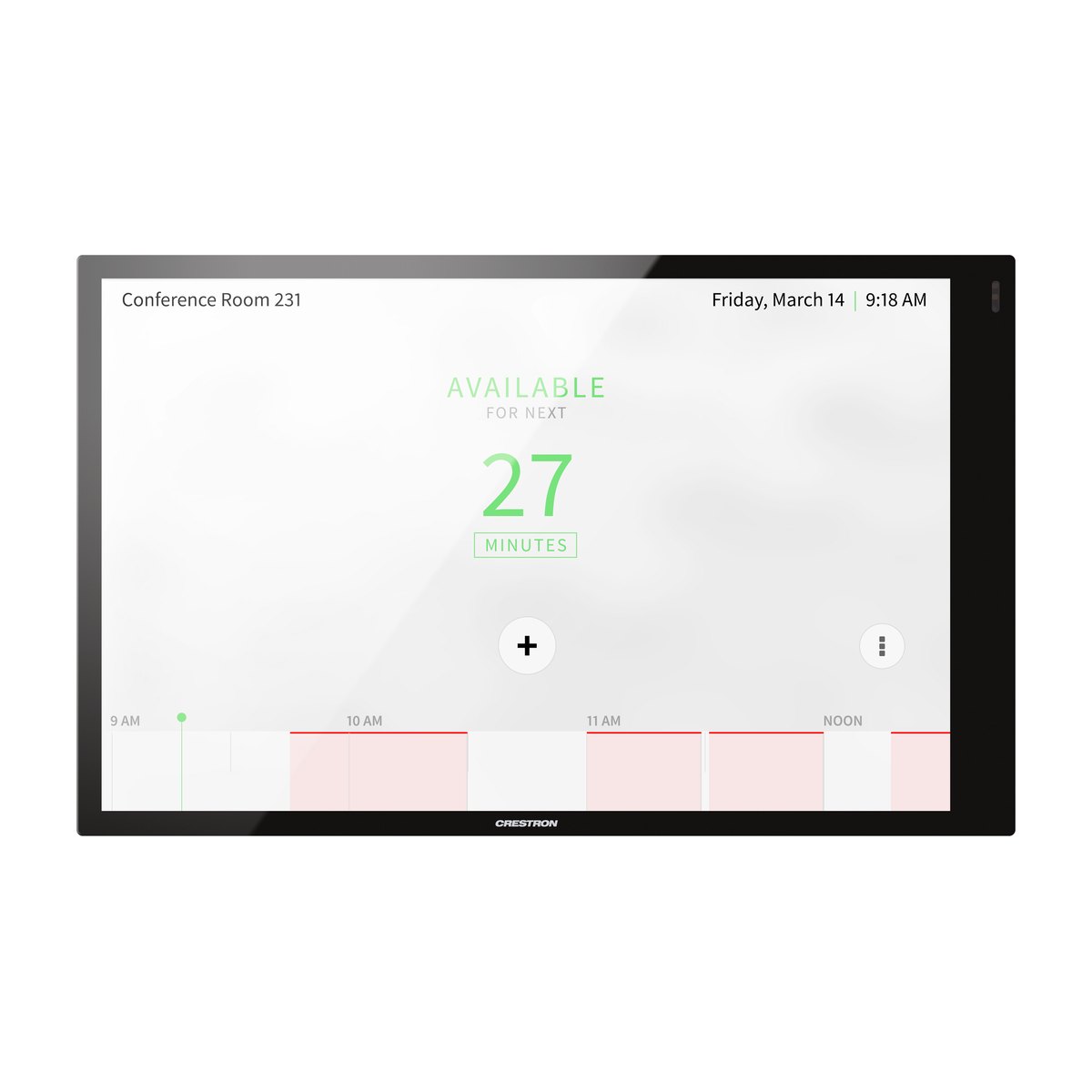
Crestron TSW-1070 is a 10.1-inch wall-mount touch screen that serves as the control interface for meeting rooms, classrooms and control rooms. A single PoE+ network cable carries power, control and video to the panel. Besides a custom control interface, it can run Microsoft Teams, Zoom Rooms or a room scheduling app.
Key specifications
Value
Display
10.1", 1920 × 1200, 5-point capacitive touch
Connectivity
One PoE+ cable (802.3at) for power, control, video and intercom
Platforms
Teams (with UC-ENGINE), Zoom Rooms, room scheduling, custom UI
Audio and video
Microphone, speaker, Rava SIP intercom, 1080p30 video streaming
Security and management
802.1X, Active Directory; remote management via XiO Cloud
The Crestron TSW-1070 is the largest model in the TSW-x70 touch screen series. Its siblings are the Crestron TSW-770 (7-inch) and the Crestron TSW-570 (5-inch). All three share the same processing hardware: 2 GB of RAM and 16 GB of internal storage.
The TSW-1070 has replaced the TSW-1060 since 2020. Organizations running a TSW-1060 or an older Crestron panel can upgrade without rebuilding the wall, using Crestron's retrofit brackets (see the accessories section).
The panel comes in two colors, black (TSW-1070-B-S) and white (TSW-1070-W-S), with identical specifications.
How it works
The TSW-1070 follows an input → processing → output flow:
Input: users touch the screen or give voice commands. A proximity sensor wakes the display when someone approaches. The panel can also receive H.264/H.265 video streams over the network.
Processing: the panel runs a control interface built in HTML5 or Smart Graphics. Alternatively, it runs one native app selected during setup: Teams, Zoom Rooms or room scheduling.
Output: commands go over the network to a Crestron control processor, which operates the projector, audio, lighting and shades and sends real-time status back to the screen.
All of this runs over one LAN cable. PoE+ (Power over Ethernet) supplies the power, so no wall outlet is needed at the mounting point.
Role of the TSW-1070 in a meeting room system
The TSW-1070 is a user interface. It does not drive AV equipment directly. What else is required depends on how the panel is deployed.
Mode
Also required
Programming needed?
Custom AV control
Crestron control processor
Yes
Microsoft Teams Rooms
UC-ENGINE or UC-BRKT-100-ASSY
No
Zoom Rooms
Mini PC or Mac running Zoom + Zoom Rooms subscription
No
Room scheduling
Exchange/Office 365/Google account; optional LB light bar
No
→ In short: a room that only needs Teams meetings or scheduling does not need a control processor.
Features and integration
Key features
10.1" 1920 × 1200 display with auto-brightness and a proximity sensor. 400 nits, 1000:1 contrast, ±80° viewing angles. → The screen wakes as people approach and stays readable in bright rooms.
Six programmable soft buttons. The toolbar offers Power, Home, Lights, Up, Down and Mic, each of which can be shown or hidden. → The most common actions are always one tap away, on every page.
Custom interfaces in HTML5 and Smart Graphics. Programmers design the layout room by room. → Each room gets a consistent layout that follows your organization's visual identity.
Network video streaming. H.265, H.264 and MJPEG at up to 1920 × 1080 @30 fps. → View an IP camera or another video source on the panel without running extra video cable.
Rava SIP intercom with built-in microphone and speaker. SIP (Session Initiation Protocol) is the standard protocol for voice over IP. → Rooms can talk to each other or call through an existing SIP phone system.
Enterprise-grade security. 802.1X, TLS, SSH, HTTPS, Active Directory and SNMP. → The panel fits the network policies set by your IT department, an important check for banks and government agencies.
Where the TSW-1070 fits
Boardrooms, medium and large meeting rooms: the 10.1" screen has room for interfaces that control many devices.
Meeting room doors: in scheduling mode it shows the day's bookings and lets people book on the spot.
Classrooms and lecture halls: mounts into a lectern (51 × 96 mm cutout) or on the wall.
Control rooms: view camera streams and control systems from the same screen.
For small rooms or doors that only need scheduling, a TSW-770 or TSW-570 may be enough. The TSW-1070 vs TSW-770 vs TSW-570 comparison table helps you choose.
Microsoft Teams and Zoom Rooms compatibility
The TSW-1070 has a native Microsoft Teams app. That app requires a UC-ENGINE meeting room computer or a UC-BRKT-100-ASSY kit; the panel itself does not run the Teams meeting.
With Zoom Rooms, the TSW-1070 acts as the room controller. The system also needs a mini PC or Mac running Zoom, a Zoom Rooms subscription, and a camera, microphone and speakers. The panel can switch between Zoom and the AV control interface. Zoom's ultrasonic proximity sharing reaches about 2.74 m (9 ft).
Mobile control: Crestron ONE recognizes the room via a Bluetooth beacon (requires an SW-MOBILITY license).
Calendars: Microsoft Exchange/Office 365, Google Calendar, 25Live and Ad Astra.
Third party: Sonos (native app) and SIP phone systems.
Setup, programming and remote management
Teams, Zoom and scheduling modes are configured from the on-screen setup menu or the web interface, with no programming.
A custom AV control interface does require programming. At DSG Tech, this is done by Crestron-certified programmers. After handover, your IT team can configure, monitor and update firmware on many panels at once through XiO Cloud.
In the box and accessories
What's in the box
Item
Purpose
TSW-1070 touch screen
—
Mounting bracket
Fits 2- or 3-gang US boxes, 2-gang European/UK boxes or drywall
Security kit with key
Prevents unauthorized removal
Screws and 4 anchors
Wall or drywall installation
Required additional equipment
⚠️ No power supply is included. The TSW-1070 needs IEEE 802.3at Type 2 PoE+. On standard PoE (802.3af) the screen still runs, but both USB ports are disabled, so a room status light bar or an RFID reader cannot be used.
Equipment
When it is needed
PoE+ source: CEN-SW-POE-5 or CEN-SWPOE-16 switch, PWE-4803RU injector, or another PoE+ switch
Always
UC-ENGINE or UC-BRKT-100-ASSY
For Microsoft Teams
Mini PC or Mac + Zoom Rooms subscription
For Zoom Rooms
Crestron control processor
For a custom AV control interface
Optional accessories
Need
Accessory
Room scheduling
TSW-1070-LB (180° LED status bar, needs PoE+), SSW / SSC (hallway signs), RFID-USB (card reader), CEN-ODT-C-POE (occupancy sensor that detects booked but unused rooms)
Each deployment mode needs a different set of accessories. Send us the number of rooms and how each will be used (AV control, Teams, Zoom or scheduling) via Zalo 088.86 88 809, and DSG Tech will propose a configuration with every required item included, so nothing is missing from the quote.
Buying from DSG Tech
Genuine products with CO/CQ
DSG Tech is a Crestron Silver Partner. The TSW-1070 is supplied with genuine CO/CQ (certificates of origin and quality).
According to Crestron, the TSW-1070 complies with FCC Part 15 Class B, CE and IC and is TAA compliant. These details can be used in technical submissions for projects and tenders.
Warranty
Genuine manufacturer warranty for each device, with terms stated in the contract.
Quotes, payment and delivery
DSG Tech does not publish a price list. Cost depends on the number of rooms, the deployment mode and the existing network infrastructure. We quote after a site survey, with every required accessory included.
For delivery times, VAT and payment terms, please contact us via Zalo 088.86 88 809 or email dsg@dsgvn.com.
Site survey and programming by Crestron-certified staff
On-site survey: DSG Tech engineers survey the site to choose the right deployment mode and check the PoE+ infrastructure and mounting positions.
Interface programming: Crestron-certified programmers design and program the control interface for each room.
Frequently asked questions about the Crestron TSW-1070
Does the TSW-1070 work with Microsoft Teams?
Yes. The TSW-1070 has a native Microsoft Teams app, but it must be paired with a UC-ENGINE meeting room computer or a UC-BRKT-100-ASSY kit. The computer runs the meeting, and the TSW-1070 is the control panel on the table or wall. Teams mode is configured on the panel itself, with no programming.
Does the TSW-1070 need a Crestron control processor?
It depends on the deployment mode. Teams, Zoom Rooms and room scheduling modes do not need a control processor. A custom AV control interface (turning on the projector, adjusting volume, lighting and shades) does require a Crestron processor, which receives commands from the panel over the network.
What type of PoE does the TSW-1070 need?
The TSW-1070 needs IEEE 802.3at Type 2 PoE+, drawing 15–30 W depending on configuration. A standard 802.3af PoE switch can still run the screen, but both USB ports will be disabled, so a status light bar or card reader cannot be connected. No power supply is included in the box.
Can the TSW-1070 be mounted on a glass wall or a meeting room door?
Yes. The TSW-770/1070-MUMK kit mounts the panel on a glass wall frame, and the TSW-1070-MSMK kit mounts it on any flat surface, which suits meeting room doors in scheduling mode. Both are optional accessories. DSG Tech engineers confirm the right kit during the site survey.
Can I replace a TSW-1060 or an older Crestron panel without rebuilding the wall?
Usually, yes. Crestron's TSW-770/1070-RMB-1, -RMB-2 and TSW-1070-RMB-3 retrofit brackets fit the TSW-1070 into the opening of an older panel. The right bracket depends on the model currently installed, which DSG Tech checks before making a recommendation.
Does a TSW-1070 bought from DSG Tech come with CO/CQ?
Yes. Every TSW-1070 supplied by DSG Tech, a Crestron Silver Partner, comes with full, genuine CO/CQ documents. Each device carries a genuine manufacturer warranty, with terms stated in the contract. For delivery times, VAT and payment, contact us via Zalo 088.86 88 809 or dsg@dsgvn.com.
Need TSW-1070 panels configured for your meeting rooms? DSG Tech surveys the site and quotes a complete system with every required accessory. Send the number of rooms and how they will be used via Zalo 088.86 88 809 or email dsg@dsgvn.com.
2 × USB 2.0 Type A (scheduling accessories; one light bar or one indicator at most)
Environmental
Temperature / humidity
0–40 °C / 10–95% RH non-condensing
Heat dissipation
44 BTU/h
Construction
Housing
Black or white plastic, edge-to-edge glass
Mounting
2- or 3-gang US box, 2-gang European box (DIN 49073), 2-gang UK box (BS 4662); lectern (51 × 96 mm cutout); minimum mounting depth 35 mm
Dimensions / weight
149 × 240 × 51 mm / 730 g
Compliance
Certifications
IC, CE, FCC Part 15 Class B; TAA compliant; Regulatory Model M201923003
TSW-1070 vs TSW-770 vs TSW-570
Specification
TSW-570
TSW-770
TSW-1070
Screen
5"
7"
10.1"
Resolution
1280 × 720
1280 × 800
1920 × 1200
Brightness / contrast
400 nits / 800:1
350 nits / 850:1
400 nits / 1000:1
RAM / storage
2 GB / 16 GB
2 GB / 16 GB
2 GB / 16 GB
Wi-Fi
No
Yes
Yes
Rava intercom
No
Yes
Yes
Video streaming
1080p30
1080p30
1080p30
Power
PoE+ (15–30 W)
PoE+ (15–30 W)
PoE+ (15–30 W); USB requires PoE+
Dimensions (H × W × D)
72 × 131 × 50 mm
106 × 173 × 51 mm
149 × 240 × 51 mm
Weight
250 g
400 g
730 g
Best for
Small room doors, simple control
Medium meeting rooms, scheduling
Boardrooms, large meeting rooms, classrooms, control rooms
Choose the TSW-1070 for rooms that control many devices or display camera streams. For a door that only shows bookings, a TSW-770 or TSW-570 takes up less wall space.
With a global network of partners and a dedicated team of professionals, DSG is is committed to delivering the most innovative and comprehensive solutions available.