

Loading...
Contact us
Loading...
Contact us
Crestron UC-MX50-T – Crestron Flex Advanced Tabletop Medium Room Kit for Microsoft Teams Rooms

Crestron UC-MX50-T – Crestron Flex Advanced Tabletop Medium Room Kit for Microsoft Teams Rooms

Contact

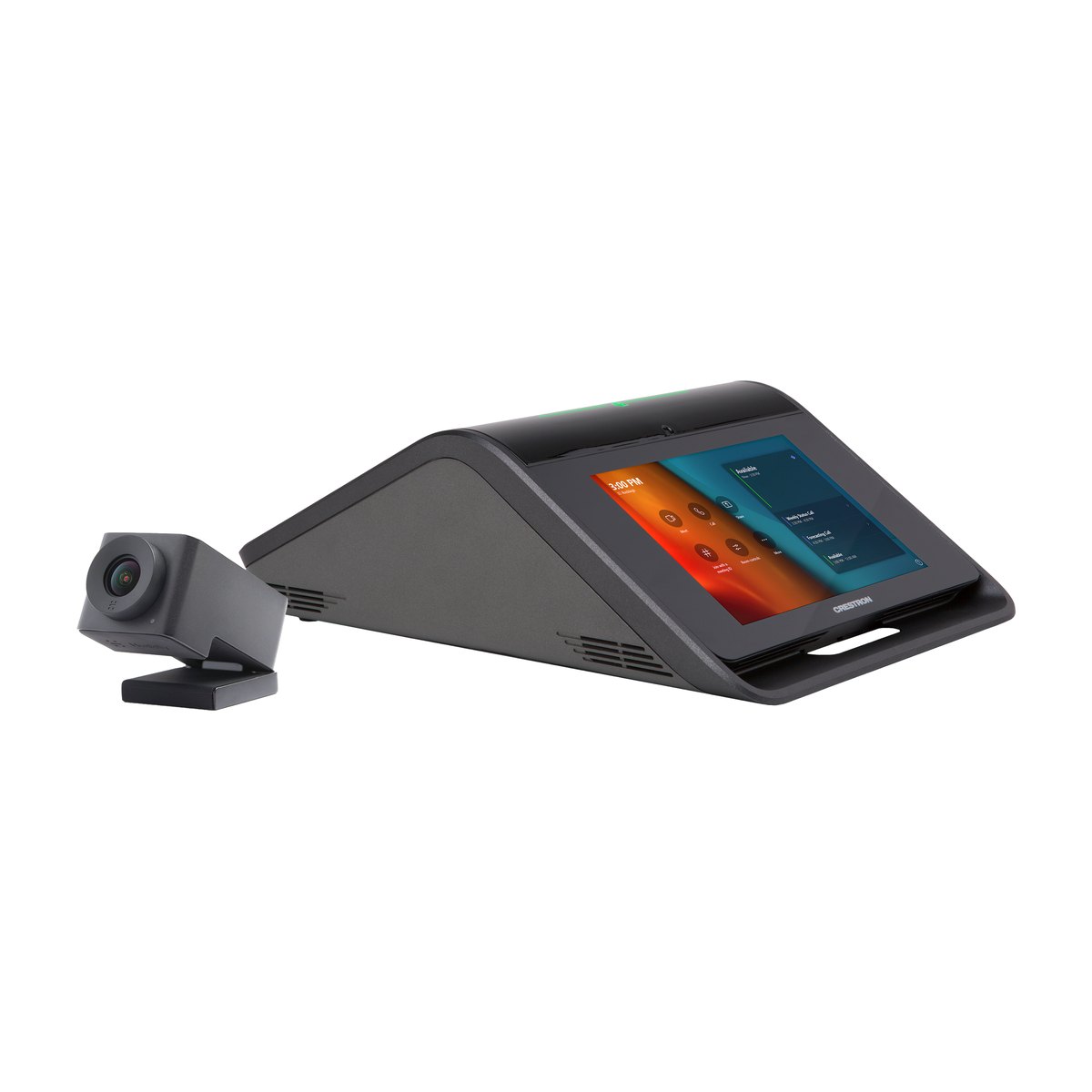
Crestron UC-MX50-T (ordered as UC-MX50-T KIT) is a Crestron Flex video conferencing kit that runs Microsoft Teams Rooms, built for medium meeting rooms of up to 8 people. The kit includes a 7-inch touch screen tabletop device with speaker and microphones, a 150° wide-angle camera, and a UC bracket pre-assembled with the Teams computer and a content ingest unit for guest laptops (BYOD, Bring Your Own Device: guests connect their own laptop). Your organization only needs to add displays and mounts.

Key specificationsValue
PlatformMicrosoft Teams Rooms on Windows, listed in Microsoft's certified hardware catalog, supports BYOD
Room sizeMedium meeting room, up to 8 people
CameraCCS-CAM-USB-F-400: 12 MP, 150° diagonal, 1080p30, Genius Framing auto-framing
Speaker and microphones7" tabletop device: 4 × 360° microphones with about 6 m pickup, echo cancellation, 11 W speaker
Displays and cabling1–2 displays at 1080p, DM Ultra cable up to 300 ft (about 91 m) from the table to the UC bracket
  • Variants: no color variants. The version without a camera is UC-MX50-NC-T, and the Zoom Rooms version is UC-MX50-Z
  • Availability: contact us for availability
  • Crestron Silver Partner · Genuine CO/CQ · Crestron-certified programmers

Send us your room size and number of participants to receive a configuration and a quote.

Download datasheet · Zalo 088.86 88 809 · dsg@dsgvn.com

What is the Crestron UC-MX50-T?

Introducing the Crestron UC-MX50-T

The Crestron UC-MX50-T is a complete tabletop video conferencing system for medium Microsoft Teams Rooms, combining the computer, controller, speakerphone and camera. Crestron's full name for it is "Crestron Flex Advanced Tabletop Medium Room Video Conference System for Microsoft Teams Rooms", part number 6511600. The model belongs to the Crestron Flex UC-MX50 Series: "M" stands for the tabletop form factor, and "X" marks the Advanced version with BYOD.

Similar part numbers to tell apart: UC-MX50-NC-T (no camera), UC-MX50-Z (Zoom Rooms), UC-MX50-U (open platform), UC-M50-T (Teams meetings only) and UC-MX70-T (large rooms). Crestron's successor for this line is the CCC-110-T / CCC-120-T, but it is a Teams Rooms compute unit only, so the camera and tabletop device are purchased separately.

How it works

The UC-MX50-T works in three stages: input, processing and output.

  • Input: touch on the 7" screen (Teams Rooms interface), voice through the array of 4 × 360° microphones, video from the USB camera, and content from a guest laptop.
  • Processing: the UC Engine (an Intel Core mini PC running Windows 11 IoT) on the UC bracket runs Teams Rooms. The tabletop device is a USB speakerphone with echo cancellation, and the content ingest unit receives the laptop signal over DM Ultra cable.
  • Output: 1080p video goes to 1–2 displays through an HDMI port and a DisplayPort to HDMI cable, while audio plays through the tabletop device's 11 W speaker.

When a laptop is connected, the system switches to the laptop's meeting platform, and when the laptop is unplugged, it returns to Teams Rooms.

Role of the UC-MX50-T in a meeting room

The kit is the entire core of a Teams meeting room. Connection diagram:

  • The 7" tabletop device connects to the UC bracket behind the display with DM Ultra cable (up to 300 ft).
  • The UC bracket sends video to the main display over HDMI cable and to the second display over DisplayPort to HDMI cable. The USB camera plugs into the content ingest unit on the bracket.
  • The UC Engine connects through a LAN switch to the Internet to reach Microsoft Teams.
ComponentLocationRole
CCS-UC-1-X-T-V tabletop deviceCenter of the meeting tableMeeting control, speaker and microphones
CCS-CAM-USB-F-400 cameraAbove or below the display (UC-CAM-WMK mount)Captures the whole room
UC-BRKT-250/260-P-T-ASSY bracketBehind the display (VESA) or on the wallTeams Rooms computer, laptop content ingest
Display (purchased separately)Front wallShows participants and content

Features and integration of the UC-MX50-T

Key features

Complete kit with Teams Rooms preinstalled. The meeting side needs no custom design or programming, so there is no need to assemble a computer, camera and speakerphone from several vendors. Once the Microsoft account is configured, the room is ready to join meetings.

Native Teams Rooms interface on a 7" 1280 × 800 touch screen. Thanks to the familiar interface, non-IT staff can start a meeting with one tap, and every room works the same way.

BYOD, the difference from the UC-M50-T. A guest laptop uses the room's camera and speakerphone, so partners on platforms other than Teams can still meet without a second set of equipment.

DM Ultra cable up to 300 ft (about 91 m) from the meeting table to the UC bracket lets the table sit far from the display without separate HDMI and USB extenders.

12 MP camera, 150° diagonal, Genius Framing auto-framing. People sitting close to the camera are not cut out of the frame, so the room does not need a PTZ camera (pan, tilt and zoom by remote control).

Speakerphone with echo cancellation. 4 × 360° microphones with about 6 m pickup, Limes Audio TrueVoice AEC (Acoustic Echo Cancellation) and an 11 W speaker. Both sides can talk at the same time without clipping or echo, which keeps the conversation natural.

The system supports 802.1X, Active Directory, SRTP and Microsoft Intune, helping it meet the network security policies of your IT department.

Where the UC-MX50-T fits

  • Medium meeting rooms of up to 8 people, as classified by Crestron.
  • Rooms that often host partners using meeting platforms other than Teams.
  • Rooms with 2 displays: one for participants and one for content.
  • Long meeting tables: add up to 2 CCS-UCA-MIC microphones.

Rooms of up to 10 people should consider the UC-MX70-T, while rooms that meet on Microsoft Teams only can use the UC-M50-T. A detailed comparison table is in the Specifications tab.

Meeting platform compatibility

The UC-MX50-T is certified for Microsoft Teams Rooms on Windows. Microsoft's catalog (updated 16/10/2026) lists two entries for this model: a version with an ASUS computer and a version with a Dell OptiPlex computer. The CCS-CAM-USB-F-400 camera in the kit is also on the list of certified peripherals.

The kit does not run Zoom Rooms. The Zoom Rooms version is a separate part number, UC-MX50-Z. Guests can still join Zoom or Google Meet from their own laptop through BYOD.

Integration with Crestron and other systems

  • Crestron control processor (optional): the 7" screen can also control lighting, shades, air conditioning and AV, but this needs additional hardware and programming.
  • Second control point: one 10.1" touch screen from the TS-/TSW-x70 series, for example the Crestron TSW-1070. Up to 2 touch screens, or 1 touch screen and 1 Mercury device.

Setup, configuration and remote management

Teams meetings need no programming, because Teams Rooms is configured with a Microsoft account. The tabletop device connects to the UC Engine through a direct connection (quick to install, independent of the LAN) or over the network (required for management through XiO Cloud).

The network needs 2 gigabit LAN ports on the same VLAN (virtual LAN), DHCP and Internet access, and the firewall must open TCP 80/443 and UDP 3478–3481. The system updates through Windows Update and is managed remotely with XiO Cloud (subscription) or Crestron Fusion. Room control integration is handled by DSG's Crestron-certified programmers.

In the box and accessories

What's in the box

ItemQuantity
CCS-UC-1-X-T-V tabletop conference device, with PW-2420RU power supply and power cord, 3.66 m CAT5e cable, cable retainer and cable ties1
UC-BRKT-250-P-T-ASSY or UC-BRKT-260-P-T-ASSY pre-assembled UC bracket: UC Engine, ADPT-USB-ENET USB to Ethernet adapter, CAT5 to USB 3.0 content ingest unit, power supplies and mounting hardware1
CCS-CAM-USB-F-400 camera1
UC-CAM-WMK camera wall mount1
CBL-HD-6 HDMI cable (main display)1
CBL-4K-DP-HD-6 active DisplayPort to HDMI cable (second display)1
CBL-HD-THIN-HS-6 thin HDMI cable1
CBL-CAT5E-7 CAT5e LAN cable1
DM-CBL-ULTRA-PC-20 CAT6a cable, 20 ft (6.1 m)2
CBL-USB-A-BMICRO-6 USB 2.0 A to Micro B cable1
CBL-USBC-USBA-6 USB-C to USB A cable1

The UC bracket may be the 250 or 260 version, and the UC Engine may be an ASUS or Dell computer, but they work the same way.

Required additional equipment

⚠️ The UC-MX50-T tabletop device does not run on PoE/PoE+ (power over the network cable). The room needs 3 power outlets for the tabletop device, the UC Engine and the content ingest unit. The UC-M50-T can run on PoE+, so outlets are easy to overlook when moving to the UC-MX50-T. The kit also does not include displays, mounts or a Teams Rooms account.

ItemRequirementNote
Displays (1–2)Support "Wake on Sync" and "Sleep on No Sync"Not included in the kit
Display mount / wall mountVESA standard, the UC bracket attaches to the VESA bolts or to the wallNot included in the kit
Microsoft Teams Rooms accountLicensed resource account, Microsoft 365 admin rightsPurchased separately
Network and power2 gigabit LAN ports on the same VLAN, DHCP, Internet and 3 power outletsThe tabletop device does not use PoE/PoE+

Optional accessories

Part numberFunctionType
CCS-UCA-MICExpansion microphone, up to 2Optional
CCS-UCA-SMKSwivel mount that secures the tabletop device to the tableOptional
TSW-1070 / TS-107010.1" touch screen as a second control pointOptional
Crestron control processorControl lighting, shades, air conditioning and AV from the 7" screenOptional, requires programming

Licenses and software

  • XiO Cloud: free SW-XIOC plan, Premium plans priced by number of devices.
  • Crestron Fusion: SW-FUSION-C-3 (cloud) or SW-FUSION-P-L (on-premises).
  • Crestron Flex Care (UC-FLEXCARE / UC-FLEXCARE-ADD): optional support plan from Crestron.

Send your room size, number of participants and number of displays via Zalo 088.86 88 809, and DSG will propose a configuration that includes every required item.

Buying from DSG

Genuine products with CO/CQ

DSG is a Crestron Silver Partner. The UC-MX50-T is supplied with genuine CO/CQ (certificates of origin and quality).

Warranty

Genuine manufacturer warranty for each device, with terms stated in the contract.

Quotes, availability and delivery

DSG does not publish a price list. We quote after a site survey and list every item outside the kit (displays with Wake on Sync, mounts, Teams Rooms account), so your organization sees the full cost.

For availability, delivery times, VAT and payment, please contact us via Zalo 088.86 88 809 or email dsg@dsgvn.com with your room size and number of participants.

Site survey and deployment by Crestron-certified staff

  • On-site survey with nationwide deployment: we check that the displays support Wake on Sync / Sleep on No Sync, choose the UC bracket position and plan the DM Ultra cable route.
  • Preparation before installation day: 2 LAN ports on the same VLAN, 3 power outlets and firewall ports opened for Teams Rooms.
  • Crestron-certified programmers handle room control integration.

Documents for projects and tenders

Technical documents available for submissions include genuine CO/CQ, the Microsoft Teams Rooms on Windows certified hardware list that names the UC-MX50-T, and Crestron's Guide Spec under CSI code 27 41 16. The datasheet and Product Manual can be downloaded from the Specifications tab.

Frequently asked questions about the Crestron UC-MX50-T

What is included in the Crestron UC-MX50-T, and what else is needed?

The UC-MX50-T includes a 7-inch tabletop device with speaker and microphones, a 150° camera with wall mount, a UC bracket pre-assembled with the UC Engine and content ingest unit, plus power supplies and cables. Your organization also needs 1–2 displays that support Wake on Sync, mounts, a Microsoft Teams Rooms account and 2 LAN ports on the same VLAN.

Which meeting platforms does the UC-MX50-T work with?

The UC-MX50-T is certified for Microsoft Teams Rooms on Windows. The kit does not run Zoom Rooms, and the Zoom Rooms version is a separate part number, UC-MX50-Z. Guests can still join Zoom or Google Meet from their own laptop through BYOD, using the room's camera and speakerphone.

How is the UC-MX50-T different from the UC-M50-T?

The X marks the Advanced version with BYOD: the room meets on Microsoft Teams regularly and can still join meetings on other platforms when a laptop is connected, while the UC-M50-T is for Teams meetings only. The UC-MX50-T uses the premium UC bracket, which ingests content over DM Ultra cable up to 300 ft long. Its tabletop device runs on 24 VDC and does not use PoE, while the UC-M50-T can be powered by PoE+.

Should I choose the UC-MX50-T or the UC-MX70-T?

The UC-MX50-T is for medium rooms of up to 8 people and uses a 12 MP camera with a 150° field of view. The UC-MX70-T is for large rooms of up to 10 people, uses the UC-CAM-L1 20.3 MP camera with a 103° field of view and includes 1 expansion microphone. Both run Microsoft Teams Rooms, support BYOD and handle 1–2 displays.

Does installing the UC-MX50-T require programming?

Teams meetings need no programming, because Teams Rooms is configured with a Microsoft account. The UC bracket mounts behind the display using the VESA bolts or on the wall. If you want the 7" screen to control lighting, shades and air conditioning, a Crestron control processor and a Crestron programmer are required.

Does a UC-MX50-T bought from DSG come with CO/CQ?

Yes. The UC-MX50-T supplied by DSG, a Crestron Silver Partner, comes with genuine CO/CQ and a genuine manufacturer warranty for each device, with terms stated in the contract. For availability, delivery and payment, contact us via Zalo 088.86 88 809 or email dsg@dsgvn.com.

Related products

See also: Crestron Workspace Solutions

Need a Teams Rooms configuration with the Crestron UC-MX50-T? Send your room size and number of participants via Zalo 088.86 88 809 or email dsg@dsgvn.com. DSG surveys the site and quotes a complete system, listing every item that needs to be purchased separately.

See more

Specifications of the Crestron UC-MX50-T (ordered as UC-MX50-T KIT), a Microsoft Teams Rooms video conferencing kit for medium meeting rooms. Sources: UC-MX50-T datasheet Rev 09/16/25 and the Crestron Flex Product Manual (Doc. 9132T).

Key specifications

SpecificationCrestron UC-MX50-T
PlatformMicrosoft Teams Rooms on Windows, certified in Microsoft's catalog. BYOD: a guest laptop runs its own meeting platform
Recommended room sizeMedium meeting room, up to 8 people · Area: —
Kit contents7" CCS-UC-1-X-T-V tabletop device, UC-BRKT-250/260-P-T-ASSY bracket (UC Engine + BYOD content ingest unit), CCS-CAM-USB-F-400 camera + UC-CAM-WMK wall mount, power supplies and 9 cable types
Camera12 MP 1/2.3" CMOS, 150° diagonal / 120° horizontal / 90° vertical field of view, f/2.8, 1080p30. Lossless digital zoom, Genius Framing auto-framing. USB 3.1
Microphones / speaker4 × 360° microphones, about 6 m (20 ft) pickup. Limes Audio TrueVoice AEC, automatic microphone mixing, AGC, noise reduction, full-duplex IEEE 1329 Type 1. 11 W full-range speaker, 95 dB SPL @0.5 m, 90 Hz–22 kHz. Up to 2 CCS-UCA-MIC expansion microphones
Display connections1 or 2 displays (not included), 1080p, via HDMI (main display) and DisplayPort to HDMI (second display). Displays must support Wake on Sync / Sleep on No Sync
ManagementXiO Cloud (separate subscription), updates through Windows Update, Microsoft Intune client and optional Crestron Fusion

BYOD (Bring Your Own Device): guests connect their own laptop to meet using the room's camera and speakerphone. AEC (Acoustic Echo Cancellation): removes echo from the far end.

Full specifications

GroupSpecificationValue
CCS-UC-1-X-T-V tabletop deviceDisplay7" (178 mm), multi-touch capacitive, TFT active matrix, 1280 × 800
 InterfaceMicrosoft Teams Rooms UI + Crestron room control interface (optional)
 Mic mute buttons / light bar2 capacitive touch buttons with bi-color LEDs, either button toggles mute
 Echo cancellation (AEC)Limes Audio TrueVoice: echo cancellation, automatic microphone mixing, automatic gain control, dynamic noise reduction. Full-duplex IEEE 1329 Type 1
 SpeakerFull-range, 11 W amplifier, up to 95 dB SPL @0.5 m, 90 Hz–22 kHz
 MicrophonesArray of 4 × 360° microphones, typical pickup range 20 ft (6 m)
 Expansion microphonesSupports 2 CCS-UCA-MIC (purchased separately)
 Occupancy sensorPIR, range 6 ft (1.8 m) in front of the screen
 Ethernet100 Mbps, auto-switching, autonegotiating, autodiscovery, full/half duplex, DHCP, TCP/IP, UDP/IP, CIP, SSL, TLS, SSH, SFTP, SRTP, IEEE 802.1X, Active Directory, digest auth, password login, XiO Cloud, Microsoft Intune client
 USB1 × USB 2.0 micro-B (device), UAC, audio to the UC Engine (cable included)
 Power24 VDC via PW-2420RU adapter, 100–240 VAC 50/60 Hz (included). Cannot be powered by PoE/PoE+
 Dimensions / weightH 104 × W 227 × D 324 mm (4.11 × 8.92 × 12.74 in) / 2.5 kg (5.5 lb)
CCS-CAM-USB-F-400 cameraSensor12 MP 1/2.3" CMOS
 LensUltra-wide angle, 6 aspherical glass elements
 Field of view150° diagonal, 120° horizontal, 90° vertical
 Aperturef/2.8
 Automatic zoomGenius Framing: lossless digital zoom, frames the people in the room automatically
 ConnectionUSB 3.1. In the kit, the camera plugs into the content ingest unit on the UC bracket
 ResolutionHD 1080p @30 fps
 Dimensions / weightH 36 × W 41 × D 72 mm / 120 g
UC Bracket AssemblyUC EngineIntel Core mini PC, Windows 11 IoT, Ethernet 100/1000 Mbps
 UC client / managementMicrosoft Teams Rooms / XiO Cloud
 Content ingestHDMI input through a CAT5 to USB 3.0 converter. Use only DigitalMedia Ultra cable between the tabletop device and the ingest unit, up to 300 ft
 Display outputs1 or 2 displays, 1080p
 PowerUC Engine: 100–240 VAC 50/60 Hz adapter (included). Content ingest unit: 24 VDC via 100–240 VAC adapter (included)
 ConstructionBlack metal bracket, pre-assembled with the UC Engine and content ingest unit
 MountingOn the wall behind the display, or on the back of the display using the VESA mount bolts. Mounting holes spaced 100/200/300 mm, screws and anchors for walls 9.5–19 mm thick
 Dimensions / weightH 381 × W 368 × D up to 48 mm (15.00 × 14.50 × 1.87 in) / up to 3.7 kg (8.0 lb)
Deployment requirementsNetwork2 gigabit LAN ports on the same VLAN, DHCP, Internet. Open TCP 80, 443 and UDP 3478–3481, port 49500 (between the tabletop device and the UC Engine)
 Power3 power outlets (tabletop device, UC Engine, content ingest unit)
 AccountLicensed Microsoft Teams Rooms account (not included)
 Control limitsUp to 2 touch screens, or 1 touch screen + 1 Mercury device. Only 1 control device can use the direct connection
CompliancePlatform certificationListed in the Microsoft Teams Rooms on Windows catalog
 FCC / CE / UL—

UC-MX50-T vs UC-M50-T, UC-MX50-U and UC-MX70-T

SpecificationUC-M50-TUC-MX50-TUC-MX50-UUC-MX70-T
PlatformTeams Rooms (certified)Teams Rooms (certified) + BYODOpen platform: a laptop runs any meeting app (no computer in the kit)Teams Rooms (certified) + BYOD
Room sizeMedium, up to 8 peopleMedium, up to 8 peopleMedium, up to 8 peopleLarge, up to 10 people
Tabletop deviceCCS-UC-1-T-V (Mercury)CCS-UC-1-X-T-V (Mercury X)CCS-UC-1-X (Mercury X, with AirMedia, SIP, Bluetooth)CCS-UC-1-X-T-V (Mercury X)
Tabletop device powerPoE+ 802.3at Class 4 or 24 VDC24 VDC, no PoE24 VDC, no PoE24 VDC, no PoE
Computer / bracketUC-BRKT-200-S-T-ASSY (HDMI to USB ingest, no BYOD)UC-BRKT-250/260-P-T-ASSY (content ingest over CAT cable, with BYOD)No UC Engine, uses the HD-RX-USB-2000-C HDMI over CATx receiverUC-BRKT-250/260-P-T-ASSY
CameraCCS-CAM-USB-F-400, 12 MP, 150°CCS-CAM-USB-F-400, 12 MP, 150°CCS-CAM-USB-F-400, 12 MP, 150°UC-CAM-L1 (AI), 20.3 MP 1", 103° diagonal
CCS-UCA-MIC expansion microphonePurchased separatelyPurchased separately (up to 2)Purchased separately (up to 2)1 included (supports up to 2)
Number of displays1–21–211–2
Part number6511604651160065116026511597

Quick guide: for an 8-person room that regularly meets on Microsoft Teams and also needs to join meetings on other platforms from a laptop, choose the UC-MX50-T. If the room only meets on Teams, choose the UC-M50-T. Rooms of up to 10 people should use the UC-MX70-T. If your organization wants to use a laptop as the meeting computer, choose the UC-MX50-U.

Downloads

Share:

  • Chia sẻ qua viber bài: Crestron UC-MX50-T – Crestron Flex Advanced Tabletop Medium Room Kit for Microsoft Teams Rooms
  • Chia sẻ qua reddit bài:Crestron UC-MX50-T – Crestron Flex Advanced Tabletop Medium Room Kit for Microsoft Teams Rooms

Comments:

Categories

Loading...

Recent posts

Loading...

Popular services

Loading...
Need help? we are here to help you
Crestron UC-MX50-T – Crestron Flex Advanced Tabletop Medium Room Kit for Microsoft Teams Rooms
0917527572Contact with us

Related PRODUCTs

Products you may Consider

Loading...
Dandelion Saigon Company Limited - DSG
Loading...
31st Floor, Saigon Trade Center, 37 Ton Duc Thang, Sai Gon Ward, Ho Chi Minh City, Vietnam0917527572tommy@dsgvn.com
Dandelion Saigon Company Limited - DSG
Loading...
31st Floor, Saigon Trade Center, 37 Ton Duc Thang, Sai Gon Ward, Ho Chi Minh City, Vietnam0917527572tommy@dsgvn.com