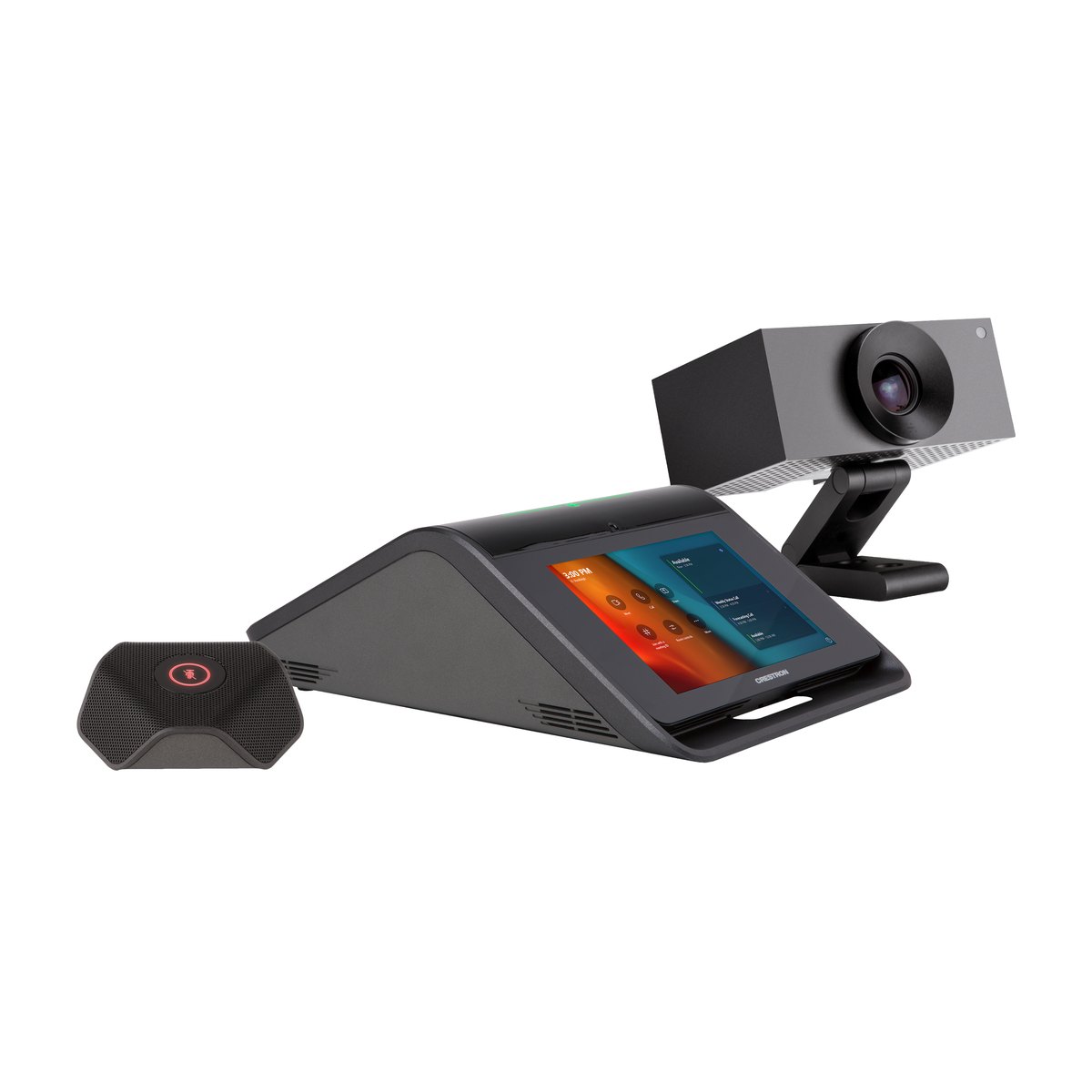
Crestron UC-MX70-T – Microsoft Teams Rooms Video Conference System for Large Meeting Rooms
Contact
Crestron UC-MX70-T is a Crestron Flex tabletop video conference system for large meeting rooms of up to 10 people, certified for Microsoft Teams Rooms. The kit includes a 7-inch control device with built-in speaker and microphones, a 20.30 MP AI camera, an expansion mic pod and a meeting room computer pre-installed on a bracket behind the display. Guests who connect a laptop can use the room's camera, microphones and speaker right away.
Key specifications
Value
Platform
Microsoft Teams Rooms on Windows, certified, BYOD via laptop
Room size
Large meeting room, up to 10 people
Camera
UC-CAM-L1: 1" 20.30 MP sensor, 103° diagonal field of view, 1080p30, auto-framing
Audio
4 × 360° microphones + 1 mic pod included (6 m pickup each), 11 W speaker
Displays
1 or 2 displays at 1080p (displays sold separately)
Versions: UC-MX70-T KIT (black, single version). Zoom Rooms version: UC-MX70-Z. Version without camera: UC-MX70-NC-T.
The Crestron UC-MX70-T is a Crestron Flex tabletop video conference system for large meeting rooms running Microsoft Teams Rooms. Crestron's full product name is "Crestron Flex Advanced Tabletop Large Room Video Conference System for Microsoft Teams Rooms", and it belongs to the Crestron Workspace Solutions family.
The model code describes the kit configuration:
Code
Meaning
M
M-Series of the Crestron Flex line
X
Advanced: accepts content from a laptop, supports BYOD
70
Large meeting room
-T
Runs Microsoft Teams Rooms
BYOD (Bring Your Own Device) means guests use their own laptop to hold a meeting with the room's equipment. The tabletop device in the kit is the Crestron Mercury X (CCS-UC-1-X-T-V).
From 2026, Crestron is developing its Teams meeting room line further on the Crestron Collab Compute platform (CCC-110-T / CCC-120-T meeting room computers, sold as individual devices).
How it works
The UC-MX70-T works in three consecutive stages: input, processing and output.
Input: voice from the 4 × 360° microphones on the tabletop device and the 3-microphone mic pod (6 m pickup each), video from the UC-CAM-L1 camera, content from a laptop over HDMI and touch input on the 7-inch screen.
Processing: the UC Engine (an Intel Core mini PC running Windows 11 IoT) runs Microsoft Teams Rooms. The tabletop device cancels echo and reduces noise, then sends audio to the UC Engine over USB, while the converter on the UC bracket brings in camera video and laptop content.
Output: video goes to 1 or 2 displays at 1080p, the conference stream goes to Microsoft Teams and audio plays through the 11 W speaker. When a guest connects a laptop, the room switches to the platform running on the laptop. When the laptop is unplugged, the room returns to Teams Rooms automatically.
Role of the UC-MX70-T in a meeting room
The UC-MX70-T is a complete Teams Rooms system for large rooms. It replaces the work of assembling a computer, speakers, microphones, a camera and a controller yourself. The connection layout below follows Crestron's installation documentation:
Location
Device
Connects to
Cable / notes
On the meeting table
Tabletop device CCS-UC-1-X-T-V
UC bracket behind the display
2 blue CAT6a cables, 6.1 m (included)
On the meeting table
Mic pod CCS-UCA-MIC
Tabletop device
Powered by the tabletop device
On the meeting table
Guest laptop (BYOD)
Tabletop device
HDMI + USB
Behind the display
UC Engine on the UC bracket
Main display / second display
HDMI / DisplayPort to HDMI cable (included)
Behind the display
CAT5 to USB 3.0 converter
UC-CAM-L1 camera
Via the USB-to-PoE adapter
Network
UC Engine, tabletop device
LAN switch
2 gigabit ports on the same VLAN
Direct connection links the tabletop device straight to the UC Engine and keeps installation simple. Network connection puts both on the LAN and is required for management through XiO Cloud.
UC-MX70-T features and integration
Key features
Native Teams Rooms interface on a 7-inch touch screen. Meetings start with one tap, so participants do not have to operate several devices. Every room works the same way as a result, and people without technical skills can start a meeting on their own.
UC-CAM-L1 AI camera. 1" 20.30 MP sensor, 103° diagonal field of view, 1080p30 and Genius Framing auto-framing. Large rooms often make it hard to capture the whole table, so the camera zooms in on the group of people seated without manual adjustment.
4 × 360° microphones and 1 mic pod included. Each pickup point covers 6 m, a second mic pod can be added, and TrueVoice echo cancellation with IEEE 1329 Type 1 full duplex is built in. On a long table the voices at the far end are easily lost, but with this configuration every seat is picked up clearly, and both sides can talk at the same time without cutting out.
BYOD via laptop. Guests connect a laptop to join Zoom or Webex using the room's camera, microphones and speaker, so partners on other platforms can still meet in the room. One room serves several platforms, and when the laptop is unplugged the system returns to Teams Rooms automatically.
UC bracket with the meeting room computer pre-installed. The UC Engine mounts behind the display on a VESA mount or on the wall and drives 1 or 2 displays. The computer does not sit under the table, which keeps the table free of cables, and large rooms can separate the participant display from the content display.
Enterprise-grade security. 802.1X, Active Directory, SSL/TLS, SRTP and a Microsoft Intune client. When the system has to pass the IT department's network security review, these standards help it meet the network policies of banks and government agencies.
A PIR occupancy sensor wakes the system when someone is within 1.83 m in front of the screen.
Which rooms the UC-MX70-T fits
Large meeting rooms of up to 10 people: long tables benefit from a second mic pod.
Rooms that often meet partners on Zoom or Webex: use BYOD right in the room.
Rooms of up to 8 people: the Crestron UC-MX50-T in the same line is a better size fit.
Microsoft Teams Rooms, Zoom and BYOD compatibility
The UC-MX70-T is certified for Microsoft Teams Rooms: it is listed in Microsoft's Teams Rooms on Windows catalog, in both the ASUS and Dell OptiPlex UC Engine versions. The included Huddly L1 camera is also listed among Microsoft's certified peripherals.
The -T version does not run Zoom Rooms, so a room that needs Zoom Rooms should use the UC-MX70-Z. Zoom and Webex meetings are still possible from a laptop in BYOD mode.
Integration with Crestron and other systems
Room control: pair with a Crestron CP4N control processor to control lighting, shades, air conditioning and AV directly from the Teams screen. This requires additional equipment and programming.
Second control point: add a TS-1070 or a Crestron TSW-1070. Up to 2 touch screens, or 1 touch screen and 1 Mercury device.
Management: XiO Cloud, Crestron Fusion (license sold separately) and Microsoft Intune.
Installation, configuration and remote management
The conferencing functions need no programming. A technician pairs the tabletop device with the UC Engine through the web interface, then signs in with the Microsoft Teams Rooms resource account. IT manages the system remotely through XiO Cloud, and the UC Engine updates through Windows Update.
Network requirements for IT
Details
Network ports
2 gigabit LAN ports on the same VLAN, with DHCP and Internet access
Teams Rooms
Open TCP 80, 443 and UDP 3478–3481
Internal system traffic
Port 49500 between the tabletop device and the UC Engine
Before deployment
Running the Microsoft Network Assessment Tool is recommended
Room control is handled by DSG's Crestron-certified programmers.
Blue CAT6a cable, 6.1 m, linking the tabletop device to the UC bracket
2
Crestron ships the 250 or 260 UC bracket, with a Dell or ASUS UC Engine depending on the batch, but the functions are the same.
Required additional equipment
⚠️ The kit does not include a display, a display mount or a Teams Rooms license, three items that are often missed when budgeting. The display must support "Wake on Sync" and "Sleep on No Sync".
Item
Requirement
Notes
Display / TV
1 required, a second is optional. Needs HDMI and support for "Wake on Sync" and "Sleep on No Sync"
Not included in the kit
Display mount
VESA standard
The UC bracket attaches to the VESA mount behind the display
Microsoft Teams Rooms account
Licensed resource account, with Microsoft 365 admin access
Not included in the kit
Infrastructure
2 gigabit LAN ports on the same VLAN with Internet access, plus power outlets at the meeting table and behind the display
Checked during the site survey
DSG's quotes list all of these items, so your organization has nothing missing at acceptance.
XiO Cloud: free tier and annual Premium subscription
Central management of many rooms
SW-FUSION-C-3 / SW-FUSION-P-L
Crestron Fusion Cloud / On-Premises edition
Asset and room schedule management across a building
Send us the number of rooms, the length of the meeting table and the display model you already have via Zalo 088.86 88 809, and we will propose a configuration with every required item included.
Buying from DSG
Genuine products with full CO/CQ for project documentation
DSG is a Crestron Silver Partner. The UC-MX70-T is supplied with genuine CO/CQ (certificates of origin and quality). The kit is listed in Microsoft's Teams Rooms certified systems catalog, so it can be used when tender documents require platform-certified equipment.
Warranty
Genuine manufacturer warranty for each device, with terms stated in the contract.
Quotes, payment and delivery
DSG does not publish a price list. We quote after a site survey and price the complete package: the UC-MX70-T, a display that supports Wake on Sync, a VESA mount, and the BYOD adapter or a second mic pod if the room needs them.
For availability, delivery times, VAT and payment terms, please contact us via Zalo 088.86 88 809 or email dsg@dsgvn.com.
Site survey and programming by Crestron-certified staff
On-site survey: we check the displays, the UC bracket position, the 6.1 m cable run from the meeting table to the display and the network infrastructure.
Room control programming: Crestron-certified programmers handle it when the system is paired with a Crestron control processor.
Frequently asked questions about the Crestron UC-MX70-T
Is the UC-MX70-T certified for Microsoft Teams Rooms? Can it be used with Zoom?
Yes. The UC-MX70-T is listed in Microsoft's catalog of certified Teams Rooms on Windows systems. The -T version does not run Zoom Rooms, so a room that needs Zoom Rooms should use the UC-MX70-Z. Participants can still join Zoom or Webex meetings by connecting a laptop (BYOD).
How many people is the UC-MX70-T designed for?
Crestron recommends the UC-MX70-T for large meeting rooms of up to 10 people. The tabletop device and the included mic pod each pick up sound within about 6 m, and one more mic pod can be added for long tables. For rooms of up to 8 people, consider the UC-MX50-T.
What else is needed besides the UC-MX70-T kit?
You need 1–2 displays with HDMI that support "Wake on Sync" and "Sleep on No Sync", plus a VESA-standard mount. The room also needs a licensed Microsoft Teams Rooms account and 2 gigabit LAN ports on the same VLAN with Internet access. None of these items are included in the kit.
How does the UC-MX70-T differ from the UC-M70-T and the UC-MX50-T?
Compared with the UC-M70-T, the UC-MX70-T can also join meetings on other platforms from a laptop (BYOD), because its Premium UC bracket accepts HDMI from the laptop, while the UC-M70-T only runs Teams meetings. Compared with the UC-MX50-T, the UC-MX70-T uses a 1" 20.30 MP camera with a 103° field of view instead of 12 MP at 150°, includes a mic pod and is designed for larger rooms. See the comparison table in the Specifications tab.
Do guests using a laptop (BYOD) need to install anything?
They may. The Huddly L1 camera connected through the network adapter requires a driver on the guest's laptop. Rooms with frequent BYOD guests should add the UC-CAMA-ADPT-ENET-USB adapter so the camera works plug-and-play, with no installation.
Does a Crestron UC-MX70-T bought from DSG come with CO/CQ?
Yes. Every UC-MX70-T supplied by DSG, a Crestron Silver Partner, comes with genuine CO/CQ and a genuine manufacturer warranty for each device, with terms stated in the contract. For availability and payment, contact us via Zalo 088.86 88 809 or email dsg@dsgvn.com.
Need a UC-MX70-T configured for your organization's large meeting room? Send us the room size, the number of participants and the display model you already have, and DSG will survey the site and quote a complete package with every required item included. Zalo 088.86 88 809 · dsg@dsgvn.com.
The specifications below follow the Crestron UC-MX70-T Spec Sheet (Rev 09/16/25), Crestron's installation documentation and Microsoft's Teams Rooms certified systems catalog.
Key specifications
Specification
Crestron UC-MX70-T
Platform
Microsoft Teams Rooms on Windows, certified, BYOD via laptop
Recommended room size
Large meeting room, up to 10 people, typical microphone pickup of 6 m per point (Crestron does not state a floor area)
Kit contents
Tabletop device CCS-UC-1-X-T-V (7", speaker, microphones), UC-CAM-L1 camera, UC bracket UC-BRKT-250/260-P-T-ASSY (UC Engine + HDMI content receiver), 1 mic pod CCS-UCA-MIC, power supplies, cables. Display and mount not included
4 × 360° microphones (6 m) + 1 mic pod with 3 microphones (6 m, 360°), up to 2 mic pods. 11 W speaker, 95 dB SPL @ 0.5 m, 90 Hz – 22 kHz. Limes Audio TrueVoice processing, AGC, noise reduction, IEEE 1329 Type 1 full duplex
Display output
1 or 2 displays, 1080p (HDMI + DisplayPort to HDMI cable)
Management
XiO Cloud (sold separately, free tier available), Microsoft Intune client, Windows Update, web interface
AGC (Automatic Gain Control) automatically balances microphone levels. BYOD (Bring Your Own Device) lets guests use their own laptop to meet through the room's camera, microphones and speaker.
Full specifications
Group
Specification
Value
Tabletop device CCS-UC-1-X-T-V
Touch screen
7 in. (178 mm), multi-touch capacitive, TFT active matrix LCD, 1280 × 800
Interface
Microsoft Teams Rooms and Crestron room control interface (optional, requires programming)
Mic mute buttons and light bar
2 capacitive touch buttons, two-color LED. Either button mutes or unmutes the microphones
Audio processing (AEC)
Limes Audio TrueVoice: echo cancellation, automatic microphone mixing, AGC, dynamic noise reduction. IEEE 1329 Type 1 full duplex
Speaker
Full range, 11 W amplifier, up to 95 dB SPL @ 0.5 m, frequency response 90 Hz – 22 kHz
Microphones
4-microphone 360° array, typical pickup range 6 m (20 ft)
1 touch button, two-color LED, mutes the whole system
Ports
2 × RJ9 4P4C (female)
Power
Supplied by the tabletop device over the A2B bus
Dimensions (H × W × D)
25 × 97 × 87 mm
Camera UC-CAM-L1
Sensor
1" CMOS, 20.30 MP
Lens
Wide angle, high-precision aspheric lens
Field of view
103° diagonal, 92° horizontal, 65° vertical
Aperture
f/2.9
Auto zoom
Genius Framing, lossless digital zoom
Resolution
1080p @ 30 fps
Connection
USB 3.0 (via USB to PoE adapter)
Power
5 VDC adapter
Dimensions / weight
53 × 122 × 89 mm (H × W × D) / 0.6 kg
UC bracket (UC Engine, content receiver)
UC Engine
Intel Core mini PC, Windows 11 IoT, 100/1000 Mbps Ethernet. Microsoft-certified configurations include the ASUS version (Core i5/i7, 8 GB RAM, 128 GB) and the Dell OptiPlex version (Core i5, 8 GB RAM, 128 GB)
Software
Microsoft Teams Rooms and XiO Cloud management client
Content input
HDMI input via the CAT5 to USB 3.0 converter. Use only DigitalMedia Ultra cable between the tabletop device and the content receiver, up to 91 m (300 ft)
Content receiver ports
AUX (USB 2.0 A), CAMERA (USB 3.0 B), CONTENT (USB 3.0 B), CAM (USB 3.0 A), power 24 V 1.25 A
Video output
1 or 2 displays, 1080p
Power
UC Engine: 100–240 VAC, 50/60 Hz adapter (included). CAT5 to USB 3.0 converter: 24 VDC via 100–240 VAC adapter (included)
Construction
Black metal bracket with the UC Engine and content receiver pre-installed
Mounting
Wall-mounted behind the display, or attached behind the display using the VESA mount bolts. Mounting holes on 2 sides, spaced 100/200/300 mm vertically
Dimensions (H × W × D)
381 × 368 × 48 mm (maximum)
Weight
3.7 kg maximum
Whole kit
Network
2 gigabit LAN ports on the same VLAN. Open TCP 80/443, UDP 3478–3481 and port 49500 between the tabletop device and the UC Engine
Environmental (temperature, humidity)
—
Safety / EMC certifications
—
Platform certification
Microsoft Teams Rooms on Windows (Microsoft catalog)
UC-MX70-T vs UC-MX50-T and UC-M70-T
Specification
UC-MX70-T
UC-MX50-T
Room size
Large room, up to 10 people
Medium room, up to 8 people
Platform
Teams Rooms on Windows, certified
Teams Rooms on Windows, certified
Control device
CCS-UC-1-X-T-V 7" (speaker, microphones)
CCS-UC-1-X-T-V
Camera
UC-CAM-L1: 1" 20.30 MP, 103° diagonal
CCS-CAM-USB-F-400: 1/2.3" 12 MP, 150° diagonal
Microphones
4 microphones + 1 mic pod included
4 microphones, mic pod sold separately
Speaker
11 W
11 W
Number of displays
1 or 2 (1080p)
1 or 2 (1080p)
BYOD
Yes
Yes
Mounting
UC bracket behind the display (VESA) or on the wall
Same as UC-MX70-T, plus a UC-CAM-WMK camera mount
The UC-M70-T has the same UC-CAM-L1 camera and mic pod and targets the same large rooms, but it uses the CCS-UC-1-T-V tabletop device and a Standard UC bracket, so it only runs Microsoft Teams meetings and cannot take a laptop to join meetings on other platforms.
How to choose: for rooms of up to 8 people, choose the UC-MX50-T. For a large room that holds Microsoft Teams meetings regularly and also needs to join meetings on other platforms (by connecting a laptop), choose the UC-MX70-T. For a large room that only holds Teams meetings, choose the UC-M70-T.
With a global network of partners and a dedicated team of professionals, DSG is is committed to delivering the most innovative and comprehensive solutions available.