Have you ever felt tired of opening a new device box only to struggle finding a driver disk, manually installing software, or dealing with complex configuration errors? Time is money, and wasting hours on unnecessary technical troubles is certainly something any business wants to avoid.
That is why the term Plug and Play (PnP) has become the gold standard in the modern technology world. PnP is not just a simple feature; it is the solution to optimizing the user experience, where a new device is automatically detected and configured by the system almost instantly. From personal computers, peripheral devices, to large-scale network infrastructure, PnP has transformed complexity into simplicity, helping you shorten the distance from "unboxing" to "ready to work" to just a few minutes.
In this article, DSG will delve into the question of what plug and play is, explore the plug and play mechanism, and also point out how to thoroughly apply PnP in the context of IoT and enterprise. Let's find out when you should prioritize PnP-enabled devices to maximize cost savings, enhance performance, and improve security for your organization.
Plug and play (abbreviated PnP) is a technology that allows a hardware device to be automatically detected, identified, and configured by the system immediately upon connection. For general users, PnP signifies the “plug and run” experience: simply plugging the device into a USB port or network allows it to be used almost immediately, without the need to manually search for and install drivers through complicated steps.
In reality, PnP is not merely a "convenient feature," but a set of technical standards regarding device identification, device classification, capability description, along with mechanisms for the operating system to automatically search, load, and assign compatible drivers. Clear illustrative examples of this technology include mice, keyboards, webcams conforming to the UVC standard (USB Video Class), storage drives conforming to the USB Mass Storage standard, printers supporting IPP/driverless printing, or monitors connected via standard digital ports such as HDMI/DisplayPort.
It is important to note that PnP does not completely eliminate the need for drivers or specialized configuration, but it shifts the majority of the setup burden to the operating system and protocol standards. As a result, ordinary users can still utilize the device in a safe and stable default mode, while specialized customizations are only necessary when they want to exploit advanced features.
To clearly understand the plug and play mechanism, we can visualize it as a sequence of events that occur automatically from the moment the device is connected:
As soon as the device is plugged in, the host hardware (such as a computer, USB hub, or network switch) detects a change in the connection port status. For example, at the USB level, the controller reports a “hot-plug” event to the operating system. In a network environment, the link-up event or the LLDP protocol (Link Layer Discovery Protocol) plays an equivalent role.
The operating system requests the device to provide a descriptor containing essential identification information such as Vendor ID (VID), Product ID (PID), version, and most importantly, the device class/subclass. For example, mice/keyboards belong to the HID class, webcams to UVC, and external drives to Mass Storage. For network devices, identification can rely on mDNS/Bonjour, UPnP, or DHCP options.
Based on the identification information (Class/VID/PID) collected, the operating system matches it against the repository of available drivers in the system (inbox drivers). If compatibility is found, the appropriate driver is loaded, necessary resources are initialized, and the device is registered into the system. If no match is found, the operating system may automatically search for drivers through update services like Windows Update, or suggest that the user install them.
The device is brought into operation with a default set of configurations, ensuring basic functionality, safe performance, and wide compatibility. As a result, UVC webcams can be used immediately with video call applications, driverless printers are ready to print via IPP, and USB drives are instantly mounted to the file system.
Finally, the operating system displays a "device is ready" notification, assigns a friendly name to the device, and grants permission for applications to use it. In centralized management environments (such as MDM/Group Policy), predetermined policies can be automatically applied.
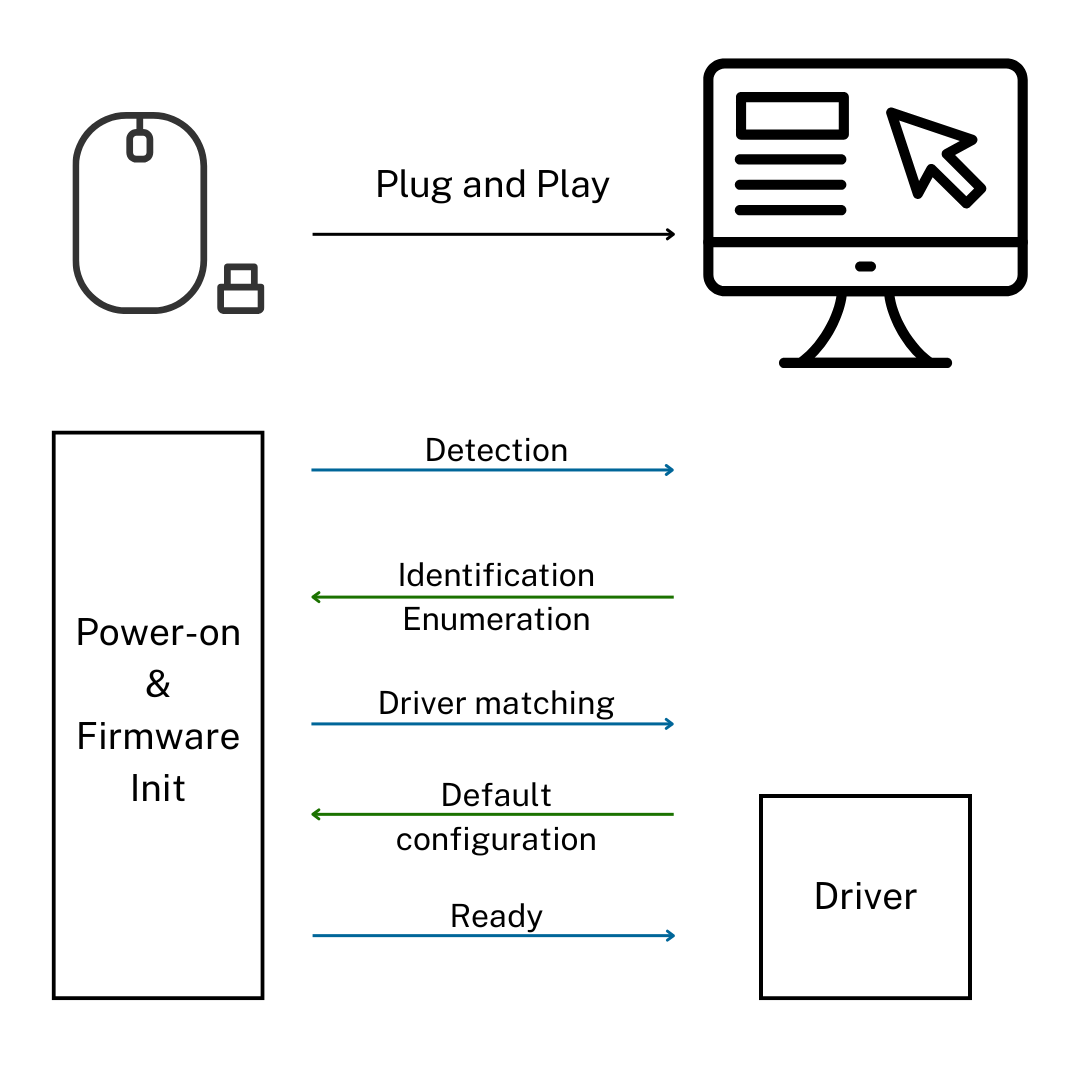
The operating mechanism of plug and play devices
In summary, for PnP to work effectively, compliance with classification standards is crucial: the more a device adheres to common classes (HID, UVC, Mass Storage), the more seamless the "plug and run" experience becomes. However, manufacturer drivers still play an important role when users need to utilize advanced or specialized features.
When expanding to the field of IoT, smart devices, and enterprise infrastructure, the concept of plug and play goes beyond simply plugging in a cable. It is upgraded to the ability for secure onboarding and automated configuration (zero-touch provisioning). Below are four typical scenarios:
Smart Device Configuration (Smart Home)
New IoT devices often support connection via QR code scanning, NFC, or Bluetooth to provision into the Wi-Fi network and pair with smart home platforms like Matter, HomeKit, or Google Home. PnP is demonstrated by the user not needing to intervene with IP addresses or driver installation; the ecosystem automatically detects, connects, and displays the device with basic control capabilities instantly.
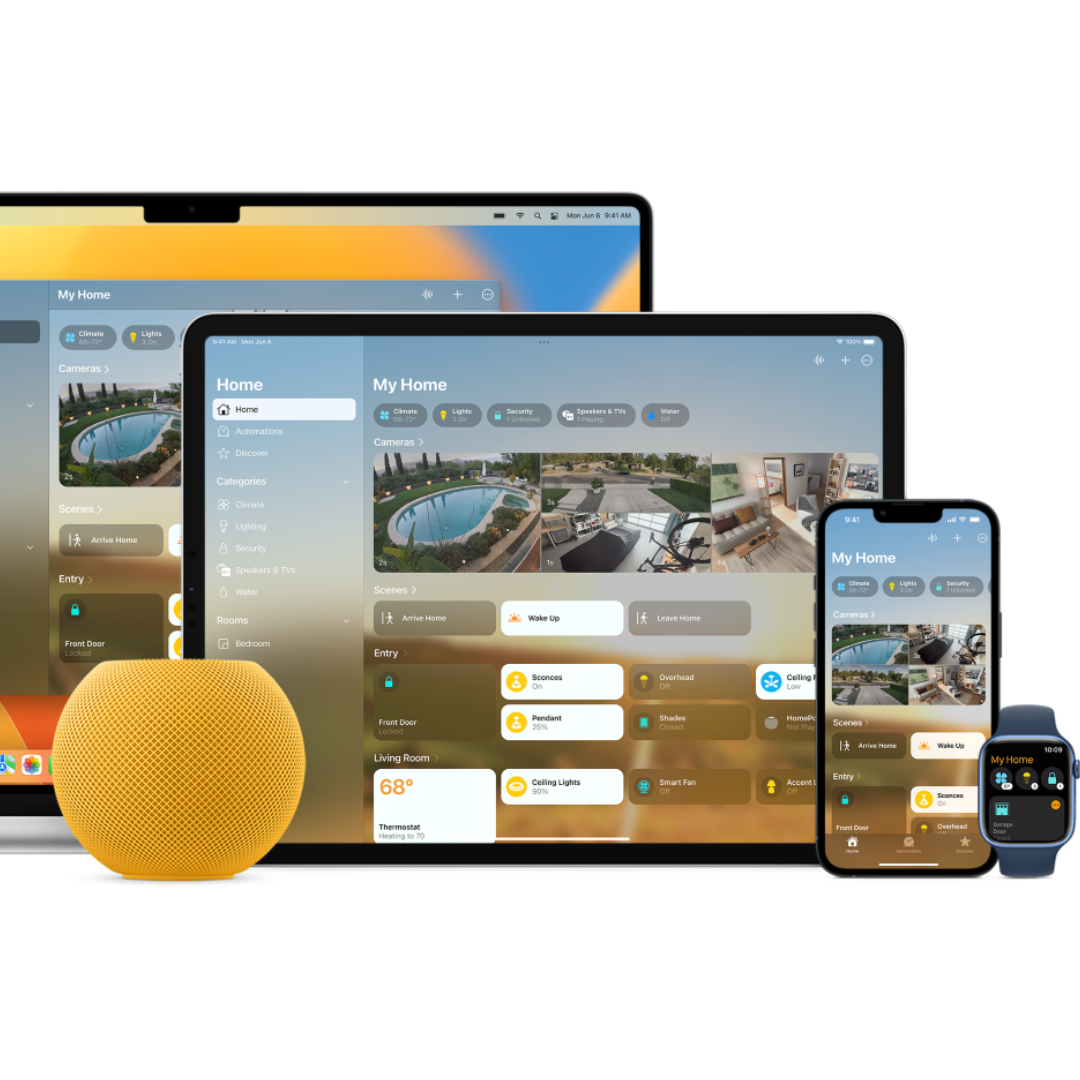
HomeKit is a plug and play ecosystem
Automated Enterprise Deployment (Zero-Touch)
In an office environment, devices such as cameras, printers, or thin clients can automatically register with the management server (MDM/Intune), receive configuration profiles (certificates, Wi-Fi SSID, access rights), and appear on the dashboard according to department/location. This minimizes manual operations by technicians, enabling rapid mass deployment.
Leveraging Common Communication Standards
Class-compliant peripheral devices such as UVC webcams and HID microphones provide maximum PnP, reducing dependence on proprietary drivers from individual manufacturers. At the network layer, service discovery protocols (mDNS/Bonjour, LLDP, SSDP) help the management system detect and map new devices into the company's asset diagram.
Security and Device Lifecycle Management
In the enterprise context, PnP must go hand-in-hand with security factors such as device authentication, encryption, OTA updates (Over-The-Air), and activity logs. A "plug and run" device that lacks security patches can quickly become a vulnerability. Therefore, PnP is considered the beginning of the device lifecycle, followed by continuous monitoring and firmware standardization.
In summary, in IoT and enterprise environments, PnP transforms from personal convenience to large-scale deployment automation capability, helping to reduce setup time while maintaining strict safety and compliance standards.
Adopting plug and play supported devices brings many strategic benefits to both end-users and IT teams: Plug and Play helps to simplify the user experience and create significant seamlessness. This process shortens the time from "unboxing" to "ready for use" to just a few minutes, eliminating the need to manually search for and install drivers, thereby reducing reliance on technical staff.
Furthermore, thanks to the broad compatibility of class-compliant devices, the system operates stably across various operating systems and applications. When maintenance is needed, PnP ensures high ease of maintenance and replacement, allowing a new device of the same standard to be hot-swapped to run immediately with the existing driver, minimizing user work disruption time.
For IT teams and management, PnP is a key solution to help lower the Total Cost of Ownership (TCO). PnP helps save significant labor hours by cutting out manual driver installation steps, complex configuration, and reducing troubleshooting time.
Regarding procedures, the Zero-touch provisioning feature combined with common device classes helps standardize deployment processes, which is especially important when installing large quantities. Finally, PnP combined with Mobile Device Management (MDM) also helps to improve system security and stability. This is achieved by enabling automatic patch deployment, limiting permissions, and tracking status, thereby reducing software conflicts and security incidents throughout the system.
.png)
Benefits of plug and play devices for users and enterprises
Not every device requires PnP to the maximum extent, but there are situations where prioritizing "plug and run" devices is the optimal choice:
Diverse user environments, limited technical support: Organizations adopting the BYOD (Bring Your Own Device) model, having dispersed teams, or lacking on-site IT should choose class-compliant devices (UVC webcam, USB Audio mic/speaker, IPP printer). This ensures functionality works immediately on Windows, macOS, and Linux.
Large-scale deployment, tight deadlines: Projects such as opening new offices, smart meeting rooms, or schools require PnP to shorten installation time. Devices supporting zero-touch/MDM are a top priority for configuration automation.
Need for stable operation, minimal intervention: Areas requiring high uptime, such as executive meeting rooms or service counters, should use PnP devices with inbox drivers and automatic update mechanisms, avoiding reliance on manufacturer software that is prone to errors.
Standardization and replacement flexibility: Enterprises wishing to reduce the risk of vendor lock-in should choose devices compliant with common class standards. When a model is discontinued, a compatible device from another manufacturer can still be replaced without changing the process.
Controlled security risk level: If the organization already has a centralized management platform (MDM, NAC, Enterprise Wi-Fi), prioritizing PnP helps accelerate installation while remaining within the security control framework, such as automatic certificate issuance and application of access policies.

Crestron Flex is designed as a plug and play KIT
However, PnP should not be solely relied upon in cases where: Specialized devices require manufacturer drivers/features (e.g., video capture cards, professional audio equipment) to achieve maximum performance. Strictly controlled environments require rigid rules regarding driver/firmware versions. In this case, PnP only serves the identification step, while detailed configuration must still adhere to internal procedures.
Plug and play is not just an answer to the narrow technical question of "what is plug and play," but also a system design philosophy that prioritizes user experience, reduces friction, and enhances standardization. The plug and play mechanism operates through a flexible combination of identification layers, drivers, configurations, and policies, powerful enough to serve individual users and disciplined enough for enterprise-scale expansion.
By choosing the right "plug and run" device, you not only save time and reduce support costs but also build a system that is always ready for future growth.
Contact DSG immediately for consultation on Zero-Touch Provisioning solutions and the most suitable PnP devices, helping your IT team save up to 80% of deployment time!