Crestron UC-MX50-U – Flex Tabletop Video Conference Kit, Open Platform for Medium Rooms
Contact
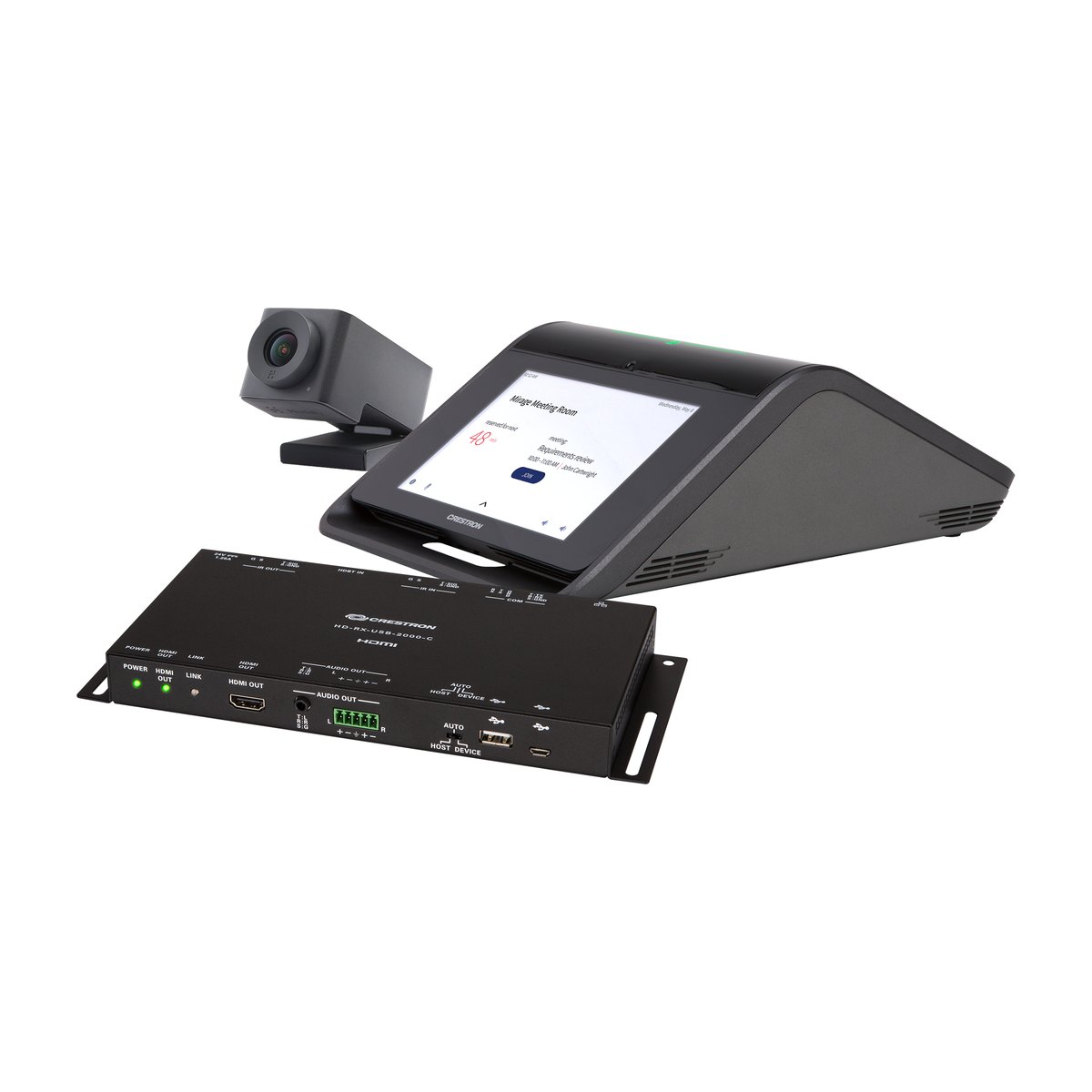
Crestron UC-MX50-U is a Crestron Flex tabletop video conference kit for medium meeting rooms of up to 8 people. The kit works as an open platform: users plug in a laptop and meet on the Microsoft Teams, Zoom or Webex app already installed on it. The main components are the CCS-UC-1-X tabletop conference device, the CCS-CAM-USB-F-400 150° camera and the HD-RX-USB-2000-C receiver, which sends video to the display over a single network cable.
Key specifications
Value
Platform
Open platform (BYOD): Teams, Zoom, Webex and others run on the user's laptop
Room size
Medium meeting room, up to 8 people, 6 m microphone pickup
The Crestron UC-MX50-U belongs to the Crestron Flex M-Series Advanced (MX) line, in the open platform group, within the Crestron Workspace Solutions range. Crestron's full name for it is the Crestron Flex Advanced Tabletop Medium Room Video Conference System.
In the model name, "X" stands for the Mercury X tabletop device (CCS-UC-1-X), "50" for a medium room and "-U" for the open platform. BYOD (Bring Your Own Device) means the meeting software runs on the participant's laptop.
The UC-MX50-U is not a Microsoft Teams Rooms system. The Teams Rooms version for the same room size is the UC-MX50-T, and the Zoom Rooms version is the UC-MX50-Z. Crestron has discontinued UC-MX50-U. Organizations equipping new rooms can contact DSG for advice on alternative solutions.
How it works
Input: the 360° 4-microphone array on the CCS-UC-1-X picks up voices, and the CCS-CAM-USB-F-400 camera captures video. The laptop sends content to the HDMI IN port, while users operate the 7" touch screen.
Processing: the CCS-UC-1-X handles echo cancellation, automatic microphone mixing, automatic gain control and noise reduction (Limes Audio TrueVoice). To the laptop, it appears as a standard UAC (USB Audio Class) audio device. The conferencing software runs on the laptop, not on any device in the kit.
Output: the CCS-UC-1-X carries HDMI, Ethernet, IR, RS-232 and CEC over 1 CAT cable to the HD-RX-USB-2000-C receiver, which outputs HDMI to 1 display. Audio plays through the 11 W speaker of the CCS-UC-1-X.
Role of the UC-MX50-U in the meeting room
The UC-MX50-U replaces a separate USB speakerphone and webcam. The room needs no dedicated computer and no Teams Rooms or Zoom Rooms room account. The HD-RX receiver only passes signals through and cannot be controlled from a Crestron control processor.
Connection diagram (based on Crestron's installation documentation):
Location
Connection
Meeting table
The laptop connects to the CCS-UC-1-X with 1 HDMI cable (HDMI IN port) and 1 USB A to Micro-B cable (USB B port)
Meeting table
The CCS-UC-1-X connects to the LAN with a 3.66 m CAT5e cable. Optional mic pods plug into the MIC POD 1–2 ports
Table to display
The TX OUT port of the CCS-UC-1-X connects to the HDBT IN port of the HD-RX-USB-2000-C with the included 6 m CAT6a cable
Behind the display
On the HD-RX, the HDMI OUT port connects to the display, the IR OUT port to the STIRP IR emitter attached to the display, and the USB port to the camera
Power
The CCS-UC-1-X and the HD-RX use 2 separate 24 V power supplies, both included
Infrastructure to prepare before installation:
Item
Quantity / requirement
Power outlets
2 (at the meeting table for the CCS-UC-1-X and behind the display for the HD-RX)
LAN port
1 for the CCS-UC-1-X (required for AirMedia and XiO Cloud)
Cable run from table to display
1 CAT cable (a 6 m CAT6a cable is included)
Display
1 display or TV with an HDMI input (not included)
Wi-Fi access point
Only if wireless AirMedia is used
In short, a room with 1 HDMI display, 2 power outlets and 1 network port is ready for a UC-MX50-U installation.
UC-MX50-U features and integration
Key features
Open platform (BYOD). Users meet on Teams, Zoom, Webex, GoTo and other apps directly on their laptops, so the room still works when each partner uses a different platform. As a result, your organization does not need to buy a meeting room computer or room licenses.
CCS-UC-1-X audio. An 11 W speaker (95 dB SPL @ 0.5 m), 4 microphones with 360° pickup up to 6 m, and full-duplex TrueVoice echo cancellation to IEEE 1329 Type 1. Bluetooth speakers or laptop microphones often echo and drop words when both sides talk at once, whereas with the CCS-UC-1-X everyone at the table hears and is heard clearly.
Up to 2 additional CCS-UCA-MIC mic pods. The mic pods are purchased separately and plug into the CCS-UC-1-X. At a long table, people at the far end can fall outside the pickup range, so mic pods extend coverage without changing the kit.
CCS-CAM-USB-F-400 camera. 12 MP, 150° diagonal field of view, 1080p30, Genius Framing auto-framing. A narrow-angle camera often cuts off people sitting at both ends of the table, while this camera sees the whole table without manual adjustment.
HD-RX-USB-2000-C receiver. HDMI (HDCP 2.2), Ethernet, IR, RS-232 and CEC (Consumer Electronics Control) travel together over 1 CAT cable. Running several cables from the table to the display is often difficult on site, but with this receiver only 1 network cable is needed. The display can also be switched on and off via CEC or IR.
HDMI presentation and AirMedia wireless presentation. Guests bring many kinds of laptops and phones, and everyone can still present. AirMedia requires a wired network connection on the CCS-UC-1-X and a separate Wi-Fi access point, while laptops with only DisplayPort or USB-C can use the CBL-MULTI-6/-12 cable kit.
In addition, a PIR occupancy sensor with a 1.83 m range wakes the screen when someone approaches. The device can also make SIP phone calls and pair with mobile phones over Bluetooth.
Where the UC-MX50-U fits
Medium meeting rooms, up to 8 people.
Shared meeting rooms: guests bring their own laptops and partners use different platforms.
Many identical rooms: the kit needs no custom design or programming.
If you need Teams Rooms or 2 displays, choose the UC-MX50-T, and for rooms of up to 10 people, consider the UC-MX70-U. The comparison table is in the Specifications tab.
Conferencing platform compatibility
Platform
Level of support
Microsoft Teams
Through the Teams app on the laptop (BYOD). Not a Teams Rooms system
Zoom
Through the Zoom app on the laptop (BYOD). Not a Zoom Rooms system
Webex, GoTo Meeting, Slack, BlueJeans, softphones
Through the laptop (BYOD), with the CCS-UC-1-X acting as a standard UAC USB audio device
If you need a Microsoft Teams Rooms system, choose the UC-MX50-T, and if you need Zoom Rooms, choose the UC-MX50-Z.
Integration with the Crestron ecosystem and third-party devices
Crestron: built-in AirMedia, XiO Cloud and Crestron Fusion (licenses sold separately).
SIP phone systems: Crestron provides configuration guides for Cisco UCM, Avaya Aura, Mitel MiVoice and ShoreTel.
Other devices: Bluetooth phones and HDMI displays with CEC, plus IR control through the STIRP emitter.
Setup, configuration and remote management
The UC-MX50-U needs no programming. The device is configured through the CCS-UC-1-X web interface or XiO Cloud. XiO Cloud also sends alerts and manages many rooms centrally. For network security, the CCS-UC-1-X supports 802.1X, Active Directory, LDAP, Kerberos, SSL/TLS, SSH, SFTP, SRTP and HTTPS.
USB 2.0 A to Micro-B cable, 1.8 m, connects the laptop to the CCS-UC-1-X
1
DM-CBL-ULTRA-PC-20
6 m CAT6a cable, connects the CCS-UC-1-X to the HD-RX
1
STIRP
3.5 mm IR emitter, controls the display over IR
1
Required additional equipment
⚠️ The kit does not include a display. A UC-MX50-U quote needs to include an HDMI display, plus a Wi-Fi access point if wireless AirMedia is used, since neither comes with the kit.
Item
When it is needed
Display or TV with an HDMI input (the kit outputs to 1 display)
Always
Laptop with an HDMI port and conferencing software installed
Send us the number of rooms, the number of participants and the ports available on your laptops via Zalo 088.86 88 809. DSG will propose a configuration with every required item, so nothing is missing from the quote.
Buying and warranty at DSG
Genuine products with genuine CO/CQ
DSG is a Crestron Silver Partner. The UC-MX50-U is supplied with genuine CO/CQ (certificates of origin and quality).
Warranty
Genuine manufacturer warranty for each device, with terms stated in the contract. The UC-MX50-U consists of 3 main devices (CCS-UC-1-X, camera and HD-RX receiver), so the warranty terms apply to each device in the kit.
Quotes, payment and delivery
DSG does not publish a price list. We quote after a site survey, including the display, the Wi-Fi access point and mic pods for long tables. For availability, delivery times, VAT and payment, please send your room size and number of participants via Zalo 088.86 88 809 or email dsg@dsgvn.com.
Site survey and configuration by Crestron-certified staff
On-site survey: we check the table and display positions, the CAT cable run, power outlets, network ports and Wi-Fi for AirMedia, then choose between the UC-MX50-U and the UC-MX70-U, and between the open platform and Teams Rooms.
Configuration: Crestron-certified programmers configure the devices and XiO Cloud according to your organization's network policies.
Documents for projects and tenders
Documents are matched to the order name "UC-MX50-U KIT", part number 6511602, with genuine CO/CQ. Crestron's datasheet and the UC-MXxx-U Guide Spec can be used for technical submissions (links in the Specifications tab).
Frequently asked questions about the Crestron UC-MX50-U
Does the UC-MX50-U work with Microsoft Teams and Zoom?
Yes. Users meet in the Teams or Zoom app on their laptop and plug it into the CCS-UC-1-X to use the room's microphones, speaker and camera. The UC-MX50-U is not a Microsoft Teams Rooms or Zoom Rooms system. If your organization needs Teams Rooms, choose the UC-MX50-T.
Does the UC-MX50-U need a meeting room computer or a room account?
No. The conferencing software runs on the participant's laptop, which connects to the CCS-UC-1-X with 1 HDMI cable and 1 USB cable, both included in the box. The room needs no Teams Rooms or Zoom Rooms license or room account.
How many people is the UC-MX50-U designed for?
According to Crestron, the UC-MX50-U is designed for medium meeting rooms of up to 8 people. The microphone array on the CCS-UC-1-X has a typical pickup range of 6 m and can be extended with up to 2 CCS-UCA-MIC mic pods. For rooms of up to 10 people, consider the UC-MX70-U.
How many displays does the UC-MX50-U support, and how is it cabled?
The kit outputs video to 1 HDMI display through the HD-RX-USB-2000-C receiver installed behind the display. Only 1 network cable is needed from the meeting table to the display, and a 6 m CAT6a cable is included in the box. The room needs 2 power outlets and 1 LAN port.
Does the UC-MX50-U support wireless presentation?
Yes. The CCS-UC-1-X has built-in AirMedia for wireless presentation from laptops, phones and tablets. This requires a wired network connection on the CCS-UC-1-X and a separate Wi-Fi access point in the room, which is not included in the kit.
Does a Crestron UC-MX50-U bought from DSG come with CO/CQ?
Yes. DSG is a Crestron Silver Partner, and the UC-MX50-U is supplied with genuine CO/CQ. Each device carries a genuine manufacturer warranty, with terms stated in the contract. For availability, VAT and payment, please contact us via Zalo 088.86 88 809 or email dsg@dsgvn.com.
Equipping a medium meeting room with the UC-MX50-U? Send your room size and number of participants via Zalo 088.86 88 809 or email dsg@dsgvn.com. DSG surveys the site and quotes a complete system, including the display and every required accessory.
The Crestron UC-MX50-U is an open platform (BYOD) Crestron Flex video conference kit for medium meeting rooms, made up of 3 main devices: the CCS-UC-1-X tabletop device, the CCS-CAM-USB-F-400 camera and the HD-RX-USB-2000-C receiver. The figures below come from Crestron's datasheet (Rev 07/13/21) and the Crestron Flex Product Manual (Doc. 9132T).
Key specifications
Specification
Crestron UC-MX50-U
Platform
Open platform (BYOD): conferencing software runs on the user's laptop (Teams, Zoom, Webex and others). Not a Teams Rooms or Zoom Rooms system, no meeting room certification
Recommended room size
Medium meeting room, up to 8 people, 6 m microphone pickup (typical)
Kit components
CCS-UC-1-X tabletop device (7" touch screen, speaker, microphones), CCS-CAM-USB-F-400 camera, HD-RX-USB-2000-C HDMI over CAT receiver, camera mount, IR emitter, cables, power supplies. No meeting room computer, no display
Camera
12 MP, 1/2.3" sensor, 150° diagonal / 120° horizontal / 90° vertical field of view, 1080p30, Genius Framing auto-framing, USB
Microphones / speaker
360° 4-microphone array, 6 m pickup, supports up to 2 expansion mic pods (sold separately). 11 W full-range speaker, 95 dB SPL @ 0.5 m, 90 Hz–22 kHz. TrueVoice echo cancellation, full-duplex
Display connection
1 display, HDMI (HDCP 2.2) through the HD-RX-USB-2000-C
Management
XiO Cloud (per-room subscription, sold separately) and the device web interface
Full specifications
Group
Specification
Value
CCS-UC-1-X tabletop device
Touch screen
7 in. (178 mm), multi-touch capacitive, TFT active matrix LCD, 1280 × 800
Mic mute button and light bar
Capacitive touch button, 2-color LED, any button mutes or unmutes the microphones
Audio processing (AEC)
Limes Audio TrueVoice: echo cancellation, automatic microphone mixing, automatic gain control (AGC), dynamic noise reduction, full-duplex IEEE 1329 Type 1
Speaker
Full-range, 11 W amplifier, up to 95 dB SPL @ 0.5 m, frequency response 90 Hz – 22 kHz
Microphones
360° 4-microphone array, typical pickup range 6 m (20 ft)
1 × USB 2.0 micro-B (device), UAC standard for audio
Ports (per connection diagram)
LAN, TX OUT, USB B, HDMI IN, MIC POD 1–2, USB/ACC, 24 V 2.5 A power
Power
24 VDC via PW-2420RU adapter (100–240 VAC, 50/60 Hz, included). Cannot be powered by PoE/PoE+
Dimensions (H × W × D)
105 × 227 × 324 mm
Weight
2.5 kg
CCS-CAM-USB-F-400 camera
Sensor
12 MP CMOS, 1/2.3"
Lens
Ultra-wide angle, 6 aspherical glass elements
Field of view
150° diagonal, 120° horizontal, 90° vertical
Aperture
f/2.8
Automatic zoom
Genius Framing, lossless digital zoom, automatically frames the people in the room
Connection
USB 3.1, plug and play
Resolution
1080p @ 30 fps
Dimensions / weight
36 × 41 × 72 mm / 120 g
HD-RX-USB-2000-C receiver
Video output
HDMI (DVI compatible, requires a CBL-HD-DVI cable sold separately)
Audio output
HDMI
Communications
100 Mbps Ethernet pass-through. USB 2.0 pass-through for the camera. Bidirectional RS-232 up to 115.2 kbaud (TxD/RxD only). IR pass-through up to 60 kHz. HDMI: HDCP 2.2, EDID, CEC pass-through
HDMI over CATx
HDCP 2.2, EDID, Ethernet, CEC/IR/RS-232. Uses CAT5e cable or better
Power (included)
PW-2412WU: input 100–240 VAC 50/60 Hz, 0.8 A max. Output 24 VDC 1.25 A
Dimensions / weight
114 × 244 × 25 mm / 776 g
Programming
Cannot be controlled from a Crestron control processor, passes signals through only
Yes: UC Engine (Intel Core mini PC, Windows 11 IoT) on a UC-BRKT-250/260-P-T-ASSY bracket
None
Yes: UC Engine on a UC-BRKT bracket
Camera
CCS-CAM-USB-F-400: 12 MP 1/2.3", 150° diagonal
CCS-CAM-USB-F-400
UC-CAM-L1: 20.30 MP 1", 103° diagonal
UC-CAM-L1
Expansion mic pods
Supports 2, sold separately
Supports 2, sold separately
1 CCS-UCA-MIC included
1 CCS-UCA-MIC included
Number of displays
1
1 or 2
1
1 or 2
Video to the display
HD-RX-USB-2000-C (HDMI over 1 CAT cable)
From the UC Engine (HDMI + DP to HDMI)
HD-RX-USB-2000-C
From the UC Engine
Notes
—
A Crestron room control interface can be added (requires programming)
The L1 camera over a network adapter requires a driver on the laptop. Use the UC-CAMA-ADPT-ENET-USB adapter (sold separately) for plug and play
A Crestron room control interface can be added
For rooms of up to 8 people where guests bring their own laptops, choose the UC-MX50-U. For rooms that need Microsoft Teams Rooms or 2 displays, choose the UC-MX50-T. For rooms of up to 10 people, choose the UC-MX70-U (open platform) or the UC-MX70-T (Teams Rooms).
With a global network of partners and a dedicated team of professionals, DSG is is committed to delivering the most innovative and comprehensive solutions available.